View Full Version : Upsampling PS vs. ACR
Herman Teeuwen
October 20th, 2006, 12:11 PM
Maybe something for the pixelpeeping department, but anyway:
We've probably all asked ourselves that question, where to upsample, in Photoshop or ACR? From Adobe we've always heard that both algorithms are very similar
There's an interesting post on the Adobe ACR forum where Adobe engineer Chris Cox confirms that ACR upsampling creates some artifacts that aren't there in Photoshop upsampling.
Quote from that thread:
"For ACR, Thomas chose a resampling kernel that gets good results but can result in more ringing artifacts than the bicubic family of resampling kernels"
See:
http://www.adobeforums.com/cgi-bin/webx?12...b6a869.3bc201eb
or here on Adobe groupbrowser
http://adobe.groupbrowser.com/t155466.html
You can see an example of this "issue" at the end of Jack Flesher's uprezzing article here:
http://www.outbackphoto.com/workflow/wf_60/essay.html
Herman
Dierk Haasis
October 20th, 2006, 12:26 PM
For the good old D1x I'd obviously go for uipsampling in the RAW converter [due to the special sensor lay-out of that camera]. For all other cases of resizing I depend on QImage - for best quality in printing - or iView MediaPro if it's Internet use. In both cases I can put in a copyright.
Kirk Thompson
October 20th, 2006, 10:20 PM
I suspect it takes less time to try both ways than to write a post about it! I tried both & the difference seemed clear.
Asher Kelman
October 21st, 2006, 12:26 AM
I suspect it takes less time to try both ways than to write a post about it! I tried both & the difference seemed clear.
What did you find were the artifacts? Also at what maginification?
Asher
KrisCarnmarker
October 21st, 2006, 02:15 AM
I agree with Dierk, use Qimage if you can (i.e. you are on a Wintel machine) for enlargements for printing. If the purpose if to enlarge the image for an agency, then I understand the agency will dictate which method is to be used.
I did quite a bit of testing between different methods a year or so ago. I tried CS2 (bicubic), PhotoZoom, Genuine Fractals and Qimage and while Qimage was not always the best, it was always equal to the best or better.
John Sheehy
October 21st, 2006, 06:35 AM
Quote from that thread:
"For ACR, Thomas chose a resampling kernel that gets good results but can result in more ringing artifacts than the bicubic family of resampling kernels"
That's a shame, because upsampling in ACR should allow better quality for chromatic aberration correction, at least in theory (if it upsamples before the correction).
Luiz Vasconcellos
October 24th, 2006, 12:25 PM
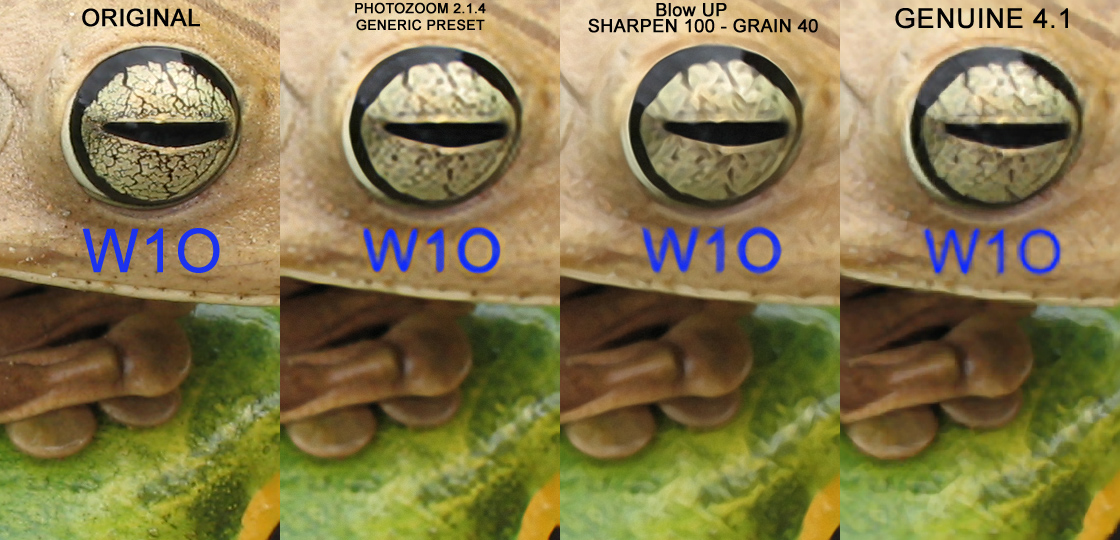
I did a simple test, shrinked the original and scaled up 400% back to the original size
with some software resizer...
When the image loads do not forget to click on it to see in full size.
[edit by Nicolas Claris] please use another webserver for posting images, advertising for porn websites is forbidden in OPF.
Nicolas Claris
October 24th, 2006, 02:01 PM
I did a simple test, shrinked the original and scaled up 400% back to the original size
with some software resizer...
When the image loads do not forget to click on it to see in full size.
[edit by Nicolas Claris] please use another webserver for posting images, advertising for porn websites is forbidden in OPF.
I've savecd your image so everybody can see it:
http://mnclaris.free.fr/forum/interpolasb7.jpg
Nicolas Claris
October 24th, 2006, 02:02 PM
I did a simple test, shrinked the original and scaled up 400% back to the original size
with some software resizer...
When the image loads do not forget to click on it to see in full size.
[edit by Nicolas Claris] please use another webserver for posting images, advertising for porn websties is forbidden in OPF.
I've saved your image so everybody can see it:
http://mnclaris.free.fr/forum/interpolasb7.jpg
Asher Kelman
October 24th, 2006, 03:03 PM
I did a simple test, shrinked the original and scaled up 400% back to the original size
with some software resizer...
When the image loads do not forget to click on it to see in full size.
[edit by Nicolas Claris] please use another webserver for posting images, advertising for porn websites is forbidden in OPF.
Luiz,
Were all the images reduced initially by one common method an software. If so please provide details.
If not, then the initial step might be adding confusion. One should only test one variable at a time with complicated things, at least initially!
Also, in addition, enlarging it to 500% and then scaling it back to the original size after sharpening would be worth looking at.
Asher
Asher Kelman
October 24th, 2006, 03:06 PM
Other upressing utilities?
Who has any other software. Please state which platform it's for. I have never used "PhotoZoom" or "Blow Up".
Can one save the files upressed with Imageprint and other RIP software?
Asher
Don Lashier
October 24th, 2006, 03:13 PM
This just reinforces my conclusion after doing similar tests a couple years ago. Print them at a reasonable (~240 to 320 dpi) and I doubt you'll see any noticible difference without a loupe aside from possibly the harder edges on high/wide contrast areas that photozoom and blowup give.
- DL
Bart_van_der_Wolf
October 24th, 2006, 03:18 PM
I did a simple test, shrinked the original and scaled up 400% back to the original size
To make sure I understand what you did:
1. How did you shrink the original (application used, method used)?
2. Is that 100% -> 25% -> 100% for each dimension, or is it for Hor x Ver total surface?
Bart
Bart_van_der_Wolf
October 24th, 2006, 05:51 PM
This just reinforces my conclusion after doing similar tests a couple years ago. Print them at a reasonable (~240 to 320 dpi) and I doubt you'll see any noticible difference without a loupe aside from possibly the harder edges on high/wide contrast areas that photozoom and blowup give.
I agree as long as one isn't forced (due to output size magnification) to print at lower values than approx. 300 ppi. The differences will be small, although not unimportant (also depends on type of output medium). However, since most current Inkjet printers have a native print resolution of 600/720 ppi, there is a lot of visual improvement possible by sharpening after resampling.
It is at these admittedly extreme upsampling ratios that the differences become apparent. Some applications produce posterization and a disconnect between upsampled resolutions and edges ("harder edges" in your experience). That can become quite visible (from 'it looks un-natural' to 'it looks fake') at these extreme enlargements, especially on screen and even in print.
It is in this area that I'm pleasantly surprised by the progress still being made in applications like Qimage (Windows, or Mac with Virtual PC). The recent addition of the so-called Hybrid (SE) resampling method, seems to set another standard yet to be beaten. Its resharpening after resampling always made sense, and the resampling itself just got even more natural looking than prior methods.
There's no substitute for real resolution, but don't underestimate what good upsampling can achieve. I recently had some 1Ds2 enlargements (approx. 40x60cm, or 4.2 lp/mm) made on a Durst Epsilon from Qimage print-files, and they looked impressive, even close-up (Red gamut was a bit compromized compared to my small Canon Inkjet though, as predicted by soft proofing and gamut comparison).
Bart
Asher Kelman
October 24th, 2006, 06:23 PM
[QUOTE=Bart_van_der_Wolf........There's no substitute for real resolution, but don't underestimate what good upsampling can achieve. I recently had some 1Ds2 enlargements (approx. 40x60cm, or 4.2 lp/mm) made on a Durst Epsilon from Qimage print-files, and they looked impressive, even close-up (Red gamut was a bit compromized compared to my small Canon Inkjet though, as predicted by soft proofing and gamut comparison).
Bart[/QUOTE]
Nicolas Claris routinely blows up 1DsII files to approx 4ft x 8ft. , that's 125x250 cm, I believe!
http://idisk.mac.com/med007/Public/_MG_2941 wall Yacht+baby.jpg
The image is very sharp and impactful.
Asher
Luiz Vasconcellos
October 24th, 2006, 08:15 PM
Ooops!
Sorry about imagevenue putting porn adds :(
The original image is a 100% crop, I shrink to 25% with PhotoShop Bicubic
than scaled up to 400% with each software.
PhotoZoom Pro 2 is a stand alone software and has versions for Windows and MAC OSX
Some people think that the version 2(S-Spline XL) gives too much vectorized look and prefer
the old S-Spline...
http://www.benvista.com/main/content/content.php?page=ourproducts§ion=photozoompro_1
Alien Skin Blow Up is a PhotoShop plug-in and has versions for Windows and MAC OSX
on this simple test it gives a more vectorized look, but the image has less jaggies, look at
the eye bottom right.
http://www.alienskin.com/blowup/index.html
Genuine Fractals and pxl SmartScale are Photoshop plug-ins for Windows and MAC OSX
from http://www.ononesoftware.com
The other image...
http://img309.imageshack.us/img309/4136/18043interpolationtestvb3.jpg
Nicolas Claris
October 24th, 2006, 09:40 PM
Nicolas Claris routinely blows up 1DsII files to approx 4ft x 8ft. , that's 125x250 cm, I believe!
Asher
Thanks for posting that souvenir Asher!
In fact, it is:
300x150 (118.1'x59.05')
Nicolas Claris
October 24th, 2006, 09:43 PM
Ooops!
Sorry about imagevenue putting porn adds :(
No problem Luiz, I felt that it was not your fault so I didn't even think to ban you!
Anyway, this is a good lesson for all of us, we must be carefull when we use low rates or free webservers, they have to get some money from somewhere to run and get paid!
Advertising is not a problem unless it comes to porn or politics…
Asher Kelman
October 24th, 2006, 11:36 PM
The problem I have with porn is that it can demean people. Also it can distort the viewing base here. So while we might have pictures of unclothed human figures we don't use the 4 or 5 letter word beginning with n and rhyming with etude or food!
We want freedom for art and conversation, so if you ever want to refer to art figure studies, make sure the vocabulary will not entice search engines to find us for people looking for salacious content. With such traffic there would be adminsitrative headaches!
In general we do not censure or redact, except when Nicolas or I feel it threatens risk to someone or to OPF or in any way to the young or if it deameans or humiliates someone. So there's some responsibility in having an open forum. If there are mistakes, we can correct it, even after editing time is up. Just let us know.
Congrats everyone for being such a wholesome community that is open to different views. We want everyone to be comfortable regardless of b.g. So if there is someting you wish to post that you suspect might offend someone, it should be in the special but well attended forum in the Uptown section.
Asher
Dave New
October 25th, 2006, 11:17 AM
Advertising is not a problem unless it comes to porn or politics…
Actually, I despise sites that litter the screen with pop-over or pop-under ads, especially the ones that try to deceive you into clicking somewhere in the ad, thinking that you are dismissing it. That's why I only use for-pay sites like pbase or my own go-daddy hosted for-pay server to host shots I post links to.
Anything else I consider rude to anyone that may be interested in viewing something I've posted.
Kind of a golden rule, I guess.
Dierk Haasis
October 25th, 2006, 01:31 PM
[W]e don't use the 4 or 5 letter word beginning with n and rhyming with etude or food!
'N-aked' would be alright? Or simply X-rated?