PDA

View Full Version : Joseph Holmes workspace examples


Marian Howell
November 5th, 2006, 05:09 PM
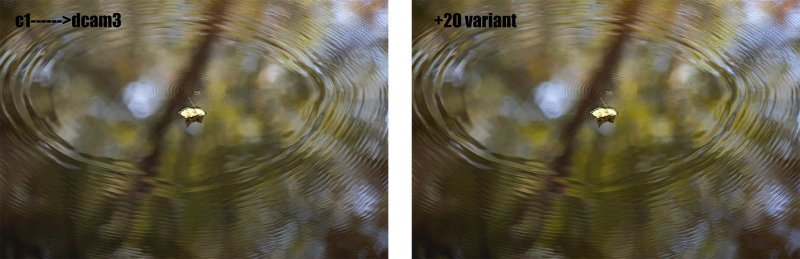
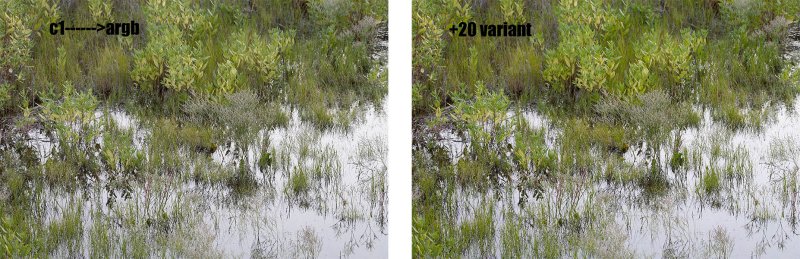
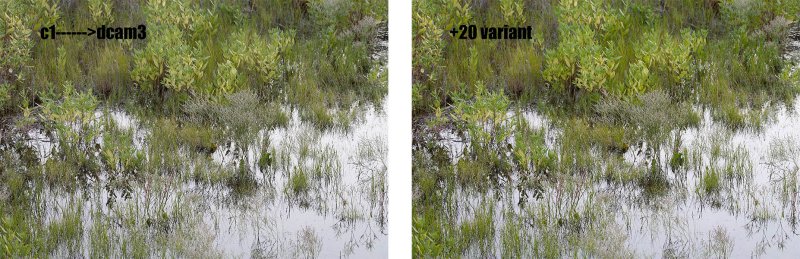
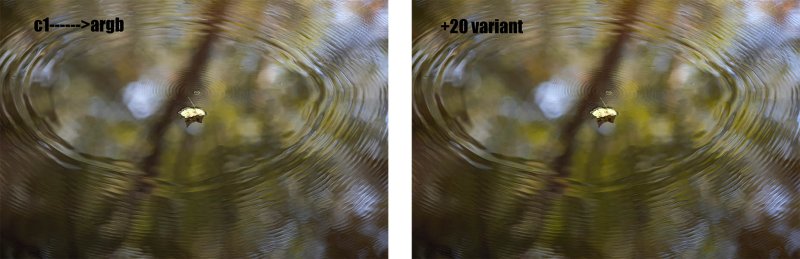
here are several pairs of images processed to show the use of Joseph Holmes' color space, as discussed in Diane's thread from last week (http://www.openphotographyforums.com/forums/showthread.php?t=1346). picking the images to use was hard, so i chose several. as i said in the earlier thread, this is very shot-dependent!
i opened the raws in c1 using magne's 5d hi-sat profile. adjustments of wb and exposure were made and these settings did not change. the image was converted twice to 16-bit tiff, once into argb and once into dcam3. these 2 images were opened in ps and copies were saved with their assigned +20 chroma variant. the original tiff and its +20 variant were then combined into 1 file, side by side. this file was then put into 8-bit mode, converted to srgb, and saved as jpg. no other work was done on these files.
in retrospect, i wish i had done a higher variant to exaggerate the difference between each of the the pairs. by the time they get to web size the difference is more subtle. the usual goal is the print! i'm posting in the thread a couple of the examples, but more can be found here (http://www.pbase.com/capecodfish/jh_examples)
as i described in the earlier thread, i do my bulk processing into argb which gives me access to the argb chroma variant set i have in photoshop. if i really intend to work on an image, i reprocess from raw in DxO, using DCam3.
http://www.pbase.com/capecodfish/image/69766954.jpg

http://www.pbase.com/capecodfish/image/69766956.jpg

http://www.pbase.com/capecodfish/image/69766950.jpg

http://www.pbase.com/capecodfish/image/69766953.jpg

Asher Kelman
November 5th, 2006, 05:24 PM
Marion,

This is so helpful. In my point of view, the C1 dcam3 +20% Variant is the most impressive in both cases but I can see that context of the feature would be important.

I could imagine painting in one version selectively to a particular part of a picture.

Hmmm!

Very powerful and clean.

Asher

Marian Howell
November 5th, 2006, 05:29 PM
Marion,

This is so helpful. In my point of view, the C1 dcam3 +20% Variant is the most impressive in both cases but I can see that context of the feature would be important.

I could imagine painting in one version selectively to a particular part of a picture.

Hmmm!

Very powerful and clean.

Asher

and very quick to do!. and yes, using them as layer masks and the like is just the tip of the iceberg...

Stephen_Pace
November 6th, 2006, 08:28 AM
Nice comparison Marian.

Stephen

Marian Howell
November 6th, 2006, 08:46 AM
thanks Stephen.
your example with the houses on the hillside is excellent too, and really shows off both magne's profile and chrome 100! could you possibly a shot with the same variant assigned to the generic C1 profile converted to the chrome space? that would highlight the difference between magne's and the generic one.
i think we have similar tastes in color :)

Eric Hyman
November 6th, 2006, 09:34 AM
FWIW if you are intrestersted in experieemnting, Bibble 4.9 has John's Ektaspace bult in as one of its working space profiles and it can easily be made your default.

Eric
www.bibblelabs.com

Marian Howell
November 6th, 2006, 09:56 AM
just to note, my understanding is that EktaSpace was designed for scanned photos. i think that's one of the reasons for Holmes' new spaces called DCam. and one really needs the chroma variant set for use in photoshop to quickly appreciate the full benefits. i think EktaSpace space is free (at least it used to be) and can be downloaded from Joseph Holmes site with the variants.
good to know that Bibble can convert to custom color spaces.

Herman Teeuwen
November 6th, 2006, 12:02 PM
> good to know that Bibble can convert to custom color spaces

Output spaces in Bibble are still fixed. I hope they will allow for custom spaces in the near future.

Two notes on the free Ektaspace PS 5:
- it includes a gamma 2.2 curve instead of Joseph's proprietary TRC included in his commercial profiles;
- it does not include chroma variants, only the base/master profile.

Asher Kelman
November 6th, 2006, 01:34 PM
FWIW if you are intrestersted in experieemnting, Bibble 4.9 has John's Ektaspace bult in as one of its working space profiles and it can easily be made your default.

Eric
www.bibblelabs.com

Well Eric,

How about it? Is there a way for us to add our purchased Holmes' spaces in Bibble in the future?

Asher

Herman Teeuwen
November 6th, 2006, 02:17 PM
Eric replied on my question on the Bibble forum about a year ago "We'll try and allow for custom working spaces in teh future" ( http://support.bibblelabs.com/webboard/viewtopic.php?t=3303)

Well it's all about priorities :-) No pun intended here, Eric & team are probably the most responsive people on the raw front.
I mean, look at Silkypix for example, even the new version 3 is sRGB and aRGB only (based on beta) !

Asher Kelman
November 6th, 2006, 02:28 PM
How early can Holmes' spaces be added in workflows with various different RAW processors?

Asher

Herman Teeuwen
November 6th, 2006, 02:33 PM
ACR/Lightroom: ProPhoto RGB >> Holmes (as suggested by Thomas Knoll on Adobe forums)
Bibble: idem
Capture One: Directly
LightZone: Directly

Unfortunately, the histogram in Capture One/LightZone is not based on output space which makes it impossible to check for channel clipping in RC. I believe it's on LighZone's/Fabio Riccardi's agenda though.

Cem_Usakligil
November 6th, 2006, 02:36 PM
Hi Herman,

I confess I am a bit confused re. your remark:
"Output spaces in Bibble are still fixed. I hope they will allow for custom spaces in the near future."

I have downloaded a trial version of Bibble Pro 4.9 and there is an option under the color management that allows choosing a custom out profile. When I change the profile there, I can also see the image preview and the histogram being adjusted. So what am I missing? :-).

Regards,

Cem

Herman Teeuwen
November 6th, 2006, 02:50 PM
Hi Cem,

In Bibble ( 4.9d) you can choose from a list of 15 predefined output profiles, which is I admit considerably more than ACR :-) , but there's no option to choose for any other custom profiles.

Therefore you cannot do a direct conversion from RC to e.g. one of the commercial Holmes profiles. Instead you'll have to use the wide ProPhoto RGB as an intermediate step.

Cem_Usakligil
November 6th, 2006, 02:52 PM
Hi Cem,

In Bibble you can choose from 15 predefined output profiles, which is I admit considerably more than ACR :-) , but there's no option to choose for any other custom profiles.
But that is what I don't understand. I can choose any custom profile I wish, not only predefined ones??

Cheers,

Cem

Cem_Usakligil
November 6th, 2006, 02:58 PM
But that is what I don't understand. I can choose any custom profile I wish, not only predefined ones??

Cheers,

Cem
Now I am starting to understand a bit where my confusion is coming from. You apparently refer to the 15 presets of the "Work Space" as the "output profiles". I, OTOH, refer to the "Custom Out Profile" which can be chosen freely.

If I get this Bibble thing right, the "working space" is used for internal calculations before an output image is generated. When the image is output, then the color profile is determined by the one chosen under "custom out profile". So basically, one can choose ProPhoto as the working space and assign any custom profile to the output. Is this not what you wanted? Or am I even further from the truth? :-))

Cem

Herman Teeuwen
November 6th, 2006, 03:02 PM
> You apparently refer to the 15 presets of the "Work Space" as the "output profiles".

Guilty as charged :-)

See the thread on the Bibble forums I referred to earlier Cem: http://support.bibblelabs.com/webboard/viewtopic.php?t=3303

It's explained there

Asher Kelman
November 6th, 2006, 03:08 PM
and then please come back and post your impression here!!

Asher

Cem_Usakligil
November 6th, 2006, 03:10 PM
Herman,

Thanks again for the explanation. Again, my confusion was due the fact that you have mentioned output profiles whereas Bibble calls them working spaces. I understand now why I misunderstood you to start with :-)

Cem

Edited due to an edit in Herman's last post prior to this one (LOL)

Herman Teeuwen
November 6th, 2006, 03:22 PM
Bibble converts from the " Work Space" to "Custom Out Profile" on export.

This gives you 2 options to deal with Homes' commercial profiles:

1. As the "Work Spaces" are fixed/preset, you should choose ProPhoto RGB for "Work Space" and set " Custom Out Profile" to one of the commercial Holmes profiles or,
2. In Bibble export using ProPhoto and do the conversion from ProPhoto RGB to Holmes in PS.

For what it's worth, option 1 is KodakCMS conversion (included in Bibble), option 2 is Adobe ACE.

Diane Fields
November 6th, 2006, 03:25 PM
Thank you Marion---that was very helpful. I'm going to pursue this.

Diane

Herman Teeuwen
November 6th, 2006, 03:57 PM
So the Bibble appoach may seem an extra step/conversion. We've learned to keep color space conversions to a minimum, but is it really an extra conversion:

Bibble:
Camera space >> Working space (e.g. ProPhoto RGB) >> Holmes = 2 conversions

LightZone:
Camera space >> LightZone's internal linear gamma wide gamut space >> Holmes = 2 conversions

If I'm correct, Capture One does something similar.

ACR:
Camera space >> ACR's internal gamma 1.0 version of ProPhoto >> ACR's output space (ProPhoto) >> Holmes = 3 conversions

Please feel free to shoot.

Eric Hyman
November 6th, 2006, 10:31 PM
So the Bibble appoach may seem an extra step/conversion. We've learned to keep color space conversions to a minimum, but is it really an extra conversion:

Bibble:
Camera space >> Working space (e.g. ProPhoto RGB) >> Holmes = 2 conversions


Not quite herman, try, "1". From the previous message I'm not quite sure you understand how bibble works.

Bibble allows you to pick from 15 or so *WORKING* spaces (Note output space)You can thus use Holmes *AS* your working space, Which was the whole point of adding it...Folks who want to use it can do so without another conversion. By default the image is output in your working space, although you also have the option of specifying a sperate *output* profile that can be transformed to at the end of processing (For instance to output for a given printer)

Hope that makes sense.

Eric

Asher Kelman
November 6th, 2006, 11:16 PM
The RAW programs to best choose are ones that work in the cameras color space, such C1, RAW Shooter, Raw Developer (http://www.iridientdigital.com), DXO

I am not sure about Lightzone or Aperture or Silkypix.

Does anyone know about these?

Asher

Herman Teeuwen
November 6th, 2006, 11:51 PM
Not quite herman, try, "1". From the previous message I'm not quite sure you understand how bibble works.

Bibble allows you to pick from 15 or so *WORKING* spaces (Note output space)You can thus use Holmes *AS* your working space, Which was the whole point of adding it...Folks who want to use it can do so without another conversion. By default the image is output in your working space, although you also have the option of specifying a sperate *output* profile that can be transformed to at the end of processing (For instance to output for a given printer)

Hope that makes sense.

Eric

Hi Eric,

Try typing Bibble in any of the forums and eventually Eric will show up :-) This is a compliment by the way.

I wasn't referring to the use of free Ektaspace (PS 5), which is included in "Working Spaces" in Bibble. I CAN choose Ektaspace as my working space.

I was referring/explaining the use of Holmes' commercial profiles (like Chrome 100, DCam etc.) in Bibble.

If I want to get an image into one of Holmes' commercial spaces using Bibble, I'll have to use ProPhoto RGB for "Working Space" in Bibble and e.g. Chrome 100, Dcam x as "Custom Out Profile", OR convert to ProPhoto by using ProPhoto "Working Space" in Bibble and do the conversion to Chrome 100, Dcam x in Photoshop.

Herman

Asher Kelman
November 7th, 2006, 12:40 AM
That seems like two conversions to me!

Asher

Herman Teeuwen
November 7th, 2006, 12:46 AM
The RAW programs to best choose are ones that work in the cameras color space, such C1, RAW Shooter, Raw Developer (http://www.iridientdigital.com), DXO

I am not sure about Lightzone or Aperture or Silkypix.

Does anyone know about these?

Asher

About LightZone's "Linear Color Space Editing": http://fricc.blogspot.com/2006/03/linear-color-space-editing.html

Oops, did I hear Timo Autiokari there :-)

Marian Howell
November 7th, 2006, 06:07 AM
The RAW programs to best choose are ones that work in the cameras color space, such C1, RAW Shooter, Raw Developer (http://www.iridientdigital.com), DXO

I am not sure about Lightzone or Aperture or Silkypix.

Does anyone know about these?

Asher

in aperture you can export the raw file into whatever color space profiles you have.

Asher Kelman
November 7th, 2006, 11:27 AM
I'm checking on Aperture!

If one has contacts, check on Lightzone.

Asher

Eric Hyman
November 7th, 2006, 12:31 PM
Hi Eric,

I wasn't referring to the use of free Ektaspace (PS 5), which is included in "Working Spaces" in Bibble. I CAN choose Ektaspace as my working space.

I was referring/explaining the use of Holmes' commercial profiles (like Chrome 100, DCam etc.) in Bibble.

Herman

My Bad, I misunderstood. You are correct.

Overall I wouldn't get too caught up on "how many" conversions are going on within your chosen raw app...Most work in 16 bit, and as long as you never go back up from a smaller space, the loss if any is marginal....just make sure that it internally is using a wide space, or choose a wide working space if you have a choice. Factor in also that there are lilely lots of other color space operations going on within the raw pipeline that you as an outsideer may not be aware of (For instance A trip to lab for sharpening).

Eric

Herman Teeuwen
November 7th, 2006, 02:51 PM
Thanks Eric for clarifying/confirming this.

I'm really not obsessed by the number of conversions. I was merely pointing out that it looks as if the Bibble/Holmes workflow means an extra step/conversion compared to for example LightZone that converts directly from its internal image processing space into Holmes. In reality the number of steps/conversions is exactly the same. It's just that the working space (image processing space) in Bibble is variable and fixed in LightZone.

Herman

Herman Teeuwen
November 8th, 2006, 03:00 PM
One other issue about the use of J. Holmes' profiles related to working spaces was bothering me. I wrote this e-mail to Joseph:

I'm currently using your Chrome 100, Dcam 4, aRGB/ppRGB variant sets.

On your website you explain the reason for the specific 1024-point TRC
that is included in your commercial profiles (match with perceptually
linear printers).

I was wondering how your proprietary TRC impacts image editing? Put
differently, if one works with your profiles, how important is it to EDIT
images in one of your J. Holmes working spaces?

Take for example a raw converter like Bibble. Bibble does not (yet) allow
for custom working spaces. In order to get an image into one of your
commercial profiles, I have to use ProPhoto RGB as an intermediate working
space in Bibble and then convert to Chrome 100, Dcam x etc. (in Bibble,
Photoshop whatever).

Now, raw converters like Bibble have evolved from pure converters to
"photo editors". As described above, in Bibble I have to use ProPhoto RGB
as a working space. I suspect that image editing in Bibble (necessarily
based on ProPhoto RGB) should be avoided, as this image processing in done
on basis of ProPhoto RGB instead of one of your commercial
profiles/spaces.

Another example, LightZone brings raw files into its own linear gamma
wide gamut space. Besides a raw converter, LightZone is also a very nice
Photo Editor, but image editing is done in LightZone's internal processing
space instead of one of your profiles.

Thanks in advance for your help.

Joseph's reply:

Hello Herman,

I don't think the tone curve differences between the various RGB
spaces has much of an impact on the results obtained from the various
editing tools. There certainly is an impact, but the main reason for
my optimized tone curve is to minimize the quantization error when
converting 24-bit files to printer space at the end of the editing
process. I do think that the RGB tools are apt to work nicely when
files are in RGB spaces with tone curves that are like mine, relative
to gamma curves. But I'd not claim a substantial advantage in that
regard.

Don't worry about editing in ProPhoto. Just keep the data in 48-bit
(it naturally is inside raw converters).

I have never investigated this question as I've not thought it much
of an issue, but I should, especially now that Adobe is using gamma
1.0 for LightRoom. I need a more deeply informed opinion on this
issue.

Have a good evening,

Joe Holmes

Marian Howell
November 8th, 2006, 05:01 PM
thank you Herman, both for asking the question and sharing the answer. sounds like you struck a chord with him as well :)