View Full Version : Compact fluorescent lighting
John Siewert
April 7th, 2007, 11:03 PM
I am looking into purchasing new lighting equipment for shooting interiors. I am currently using strobes and would like a continuous source. One option is a daylight balanced compact fluorescent setup. Most use multiple CF bulbs and run cooler than traditional tungsten or HMI. I am curious if anyone has encountered any issues shooting interiors with this type of light. Color casts are my biggest fear with these. I plan to shoot with simple umbrella setups so light falloff may also be an issue. If anyone knows the pros and cons of these bulbs please let me know. I also would like to find out what others are using. I am not a bank but I am open to other options. Thanks for your input.
Dave New
April 8th, 2007, 07:34 PM
Fluorescents of any kind have a reputation for being 'spikey' in their spectrum, which can do unusual things to items that tend to exhibit metamerismic effects (i.e. change perceived colors in various lighting situations).
That said, some high-end fluorescents have a reasonable (to the eye, at least) spectrum, and as long as you aren't trying to shoot for a catalog, where folks will be comparing the real item against the published photos, you may be OK, as long as you carefully color balance the scene using a WhiBal or similar. Shooting RAW will make the process a lot simpler and less destructive than attempting to color balance an 8-bit JPEG after the fact.
Finally, one compact fluorescent I've been experimenting with (at least for general room lighting for a dimroom where I'm trying to do color correcting work on a computer screen) is a Sylvania Super mini Craft Light, CF13EL/SUPERMINI/5K. These are sold by the OSRAM Sylvania division, who make claims for a high CRI (color rendering index), and I found them in stock in the local Lowe's (big box hardware/lumber store). The 13W is a 60W replacement, and there is also a 25W that is a 100W replacement. Unfortunately, there doesn't seem to be any 40W replacements, as running two 60W replacement types in a ceiling fixture makes the dimroom too bright. They or the 100W ones, though, may be just what you are looking for, if you want to use them to light a scene.
I also have experience with Ott-Lights, but in my opinion they have a definite cast towards the 6K end of the spectrum, as a number of other daylight-type fluorescents seem to have. In fact, they have a more spikey spectrum than a number of more mundane fluorescents.
Klaus Esser
April 10th, 2007, 05:49 PM
I am looking into purchasing new lighting equipment for shooting interiors. I am currently using strobes and would like a continuous source. One option is a daylight balanced compact fluorescent setup. Most use multiple CF bulbs and run cooler than traditional tungsten or HMI. I am curious if anyone has encountered any issues shooting interiors with this type of light. Color casts are my biggest fear with these. I plan to shoot with simple umbrella setups so light falloff may also be an issue. If anyone knows the pros and cons of these bulbs please let me know. I also would like to find out what others are using. I am not a bank but I am open to other options. Thanks for your input.
Hi John!
A very good light is "Kino Flo". Very good balanced tubes - professional equipment. Thereīs a "Foto Flo" range.
In my opinion an even better choice is to work with bracketing and DRI. This way you can avoid ANY additional lighting and keep a natural look.
I shoot bracketing in -2/0/+2 steps on my Canon 20D with Nikon 20mm attached (Novoflex-Adapter).
Wide angles i do by stitching and planprojecting using a Nodal-Point-Adapter.
Hereīs an example from a shot from a beauty-fair. Terrible light - a mix of hall-lighting (Quecksilber-Dampflampen), halogen spots and tungsten lights in the lamps. The picture had to be taken in 10 minutes during the opening.
Bracketing as described and hdr-tonemapping, stitched from 12 shots - the angle was about 100degree
http://www.klausesser.de/1stand_mitte.JPG
best, Klaus
Klaus Esser
April 11th, 2007, 08:49 AM
Hey John!
Hereīs another example:
shot with an Canon 20D with 20mm Nikon-lens on Novoflex-adapterring.
cameraīs WB was set to daylight, bracketing -2/0/+2 , hdr and tonemapping in Photomatix.
12 shots were stitched in AutopanoPro - the room is very small and the view-angle is about 160degree.
Projection is cylindrcal - planprojection is possible only up to about 120degree - and a little cylindrical distortion was corrected in Photoshop.
Just available light.
I tried to do the shot before with my 6x17cm MF analogue camera - didnīt work.
best, Klaus
http://www.klausesser.de/Pano_Foto_von Theke aus.JPG
besides - hereīs the url from Kino Flo/Foto Flo. I selected a very compact set:
http://www.kinoflo.com/Overview%20of%20all%20Kits/Mini-Flo%20Kits/Mini-Flo%20Kits.htm
Asher Kelman
April 11th, 2007, 04:01 PM
Klaus,
What lighting set of those on the page of Kino Flo!
I find your work very effective.
Was the camera on a tripod? Is this two rows?
What were your setting on APP?
How long does the stitch take?
I am thinking that I may need to devote 1 computer to rendering as some pictres take 2-4 hours!
from 12-90 pics.
Asher
Klaus Esser
April 11th, 2007, 05:39 PM
Klaus,
What lighting set of those on the page of Kino Flo!
I find your work very effective.
Was the camera on a tripod? Is this two rows?
What were your setting on APP?
How long does the stitch take?
I am thinking that I may need to devote 1 computer to rendering as some pictres take 2-4 hours!
from 12-90 pics.
Asher
Hey Asher!
The older i become, the more reduced i tend to work . . . "Normally" i woud pack a bundle of Balcar-Strobes into my car and let my assistant carry it all ;-) .
But i like it more and more to use only available light. The main advantage - in my opinion - of digital photography is itīs ability to handle al-situations with non-consistent light-temperatures better than film and due to a more linear than curved contrast-balance such situations are easier to do digitally.
Both pictures are three rows of about 6-8 pics - each bracketed three steps. I stitched it in AutopanoPro after generating HDR from RAW and tonemapped the HDR into TIFFs.
Youu can put bracketed (and of course non-bracketed) RAW into APP, render the stitch as hdr and do the tonemapping than . . . but i like it the other way.
I used a Gitzo No.:5 tripod with a modified Manfrotto SPH-panoramic (nodal) head.
Doing stitches for wide-angle purpose it is better to shoot symmetrical rows - which means to shoot one middle, one uo and one down row, even when you donīt need to see the down-row objects.
The stitcher renderes a planar-projection and also a cilindrical projection better and thereīs no hazzle with the horizont.
I found that about 120degree is maximum für planar-projection in APP. More is very critical.
I have a double-processor mac with 2x2GHz and 8GB RAM - so itīs very fast when APP stitches, because APP supports multiprocessing.
Very importand though is to have about 60GB of free volume-space on an extra disk just for rendering - APP wants to have very much space.
best, Klaus
Asher Kelman
April 11th, 2007, 05:57 PM
Hi Klaus,
When you bracket, are you then in Av?
I use manual mode and so it would require changing the setting each time on the camera and risk moving it. What do you do? Are you controling the camera from your laptop?
Asher
Bart_van_der_Wolf
April 11th, 2007, 06:18 PM
Doing stitches for wide-angle purpose it is better to shoot symmetrical rows - which means to shoot one middle, one uo and one down row, even when you donīt need to see the down-row objects.
While not absolutely necessary, Klaus is right. The final perspective is still defined by the actual shooting position (so what's new, not much). That means that, even when shooting a number of images for a stitched shooting, it has to be planned for the end result.
The stitcher renderes a planar-projection and also a cilindrical projection better and thereīs no hazzle with the horizont.
For the less initiated, Klaus is (implicidly) saying that the post-processing allows to correct for many different lens projections to a (planar=flat) surface (film/sensor/output-plane). Projecting the final output to above/below horizontal will introduce a distorted/curved horizon.
I found that about 120degree is maximum für planar-projection in APP. More is very critical.
Yes, choosing a shooting a Field-of-View that exceeds the final human FOV, requires a relative match to the final viewing distance, to retain 'natural perspective'.
Of course, 'natural' perspective can be 'adjusted' for the intended 'effect'.
Bart
Klaus Esser
April 11th, 2007, 06:29 PM
Hi Klaus,
When you bracket, are you then in Av?
I use manual mode and so it would require changing the setting each time on the camera and risk moving it. What do you do? Are you controling the camera from your laptop?
Asher
Hi Asher!
I always use the manual-mode. Exept of the Canon 20Dīs serial-mode - it shoots a pre-defined burst of 3 pics: -2/0/+2.
As i know, most DSLRs have this bracketing-mode. I donīt like to have a laptop or a power-book arround while shooting.
best, Klaus
Asher Kelman
April 11th, 2007, 06:51 PM
If this does it im manual, then there's another function of my 5D and 1DII that I need to check out!!
Asher
Michael Fontana
April 11th, 2007, 07:01 PM
That's interesting stuff...
Klaus, how do you correct the lens distortions?
BTW: since going digital, I prefer to work with the available light, too. It shows better the light, intended by the architects (sun, artificial light) than all the strobes, used with 4/5' and film.
Klaus Esser
April 11th, 2007, 07:26 PM
If this does it im manual, then there's another function of my 5D and 1DII that I need to check out!!
Asher
Hey Asher!
itīs named "AEB" on the display and you have to switsch to serial-exposure.
best, klaus
Klaus Esser
April 11th, 2007, 07:41 PM
That's interesting stuff...
Klaus, how do you correct the lens distortions?
BTW: since going digital, I prefer to work with the available light, too. It shows better the light, intended by the architects (sun, artificial light) than all the strobes, used with 4/5' and film.
hello Michael!
i use a 20mm and a 35mm Nikon on my Canon 20D - thereīs very low lens-distortion. And extremly low CA because in evrey shot you use mainly the center-region of the lenses.
Distortions relating to the perspective you can treat by the "vertical-line-tool" in APP. It corrects verticals in planar- and cylindrical projected pictures.
The results are comparable to shifting the lensboard or the back-frame of a view-camera.
Hereīs an example:
http://www.klausesser.de/WMx_BW.jpg
shot with 20mm, 5 rows with about 6 pics in each row, 30% overlap. Bracketing -2/0/+2.
best, Klaus
Michael Fontana
April 12th, 2007, 04:15 AM
Thanks, Klaus
I gave Autopanoo a new try - after I tested it last year - with some flatstitches, that means using a shiftlens, the Schneider PC-28 on a 1 Ds-2, by shifting the body and keeping the lens on its place. Therefore respecting the nodal point.
Going for planar projection helped a lot, but I' ve still some distortions, even when using the "vertical-line-tool".
http://imago.macbay.de/OPF/3-shots.jpg
and here's the result: http://imago.macbay.de/OPF/APP_stitch.jpg
If I try to take distortions away prior to the stitching, its not better....
Michael Fontana
April 12th, 2007, 04:43 AM
If this does it im manual, then there's another function of my 5D and 1DII that I need to check out!!
Asher
Asher, it's in the personal function, and has to be activatet, the cam beeing firewired to the mac, with EOS Viewer Uitilty. It' s C.Fn-09 for the 1 Ds-2. I'm using that function for my HDR-shots, so I don't touch - move - the cam, while bracketing.
Klaus Esser
April 12th, 2007, 04:52 AM
Thanks, Klaus
I gave Autopanoo a new try - after I tested it last year - with some flatstitches, that means using a shiftlens, the Schneider PC-28 on a 1 Ds-2, by shifting the body and keeping the lens on its place. Therefore respecting the nodal point.
Going for planar projection helped a lot, but I' ve still some distortions, even when using the "vertical-line-tool".
If I try to take distortions away prior to the stitching, its not better....
Hello Michael! (funny to correspond with you in Basel via a forum in the States . . :-) )
Camera should be oriented in portrait-mode - so you have more vertical field.
It should be NOT shifted or so - this will be done while stitching.
I suggest one row or three rows - one exactly horizontal. Overlapping should be arround 30% in both directions.
The point is: with overlapping about 30%, you use the more ideal center-field of the lens. Distortions are the lowest here. Because you can correct geometrical ABBERATIONS of the lens only with Photoshop-plugins. Better is to have none . . therefore i use Nikon-lenses on my 1Ds and 20D . . ;-) . For stitchings i tend to prefer the 20D - because of the crop uses automatically the center-regions of all (KB) lenses.
In my opinion APP is the best stitcher of all - itīs finding of CPs is very fast and very accurate and rendering is fantastic.
Other programs like RealViz Stitcher or Hugin a.s.o. make it also very good. But more uncomfortably or far more expensive (Stitcher is about 500$).
The only shortcut in APP is the lack of fisheye-support fot doing spherical panos - thatīs to come next month or so.
But spherical panos i also do with Nikon 20mm lens and about 60shots - have a look:
www.klausesser.de/Stadttor_klein.htm
best, klaus
P.S.:
"by shifting the body and keeping the lens on its place. Therefore respecting the nodal point."
did you make a correct nodal-point-alignment? That thing with two verticals - one nearby and one far away? I donīt think you can hit the NP just by shifting ;-) - let me see if i understand you correctly:
You didnīt swing the camera arround the NP but shifted it parallel to the object?
Parallel-stitching needs a moving of the complete camera with tripod and all in a way, that the camera is ALWAYS in a 90degree-angle to the object! EVERY shot has to be absolutely frontal.
Moving the back of the camera related to the center of the lens means increasing distortions outside the center! Exactly as with a view- or fieldcamera and a superwide-lens.
The advantage of rotating camera/lens arround the NPP (NoParallaxPoint - vulgo: nodalpoint) is, to have a virtual extreme wideangle-camera with extreme resolution-capability while using always the ideal (center) part of the lens. As a contrary to use the outer ranges of a lens by shifting.
Shooting in symmetrical rows allows absolutely corrections of perspective-distortion.
Michael Fontana
April 12th, 2007, 06:17 AM
geez, Klaus
a 60 shot-pano, must be fun ;-)
Id' lke to use shiftlenses, as they' re easy to handle when doing the shots; look here (http://www.outbackphoto.com/workflow/wf_58/essay.html)
With that tecnique, the nodal point is respected; one can mount the shots manually in PS, as well, it fits.
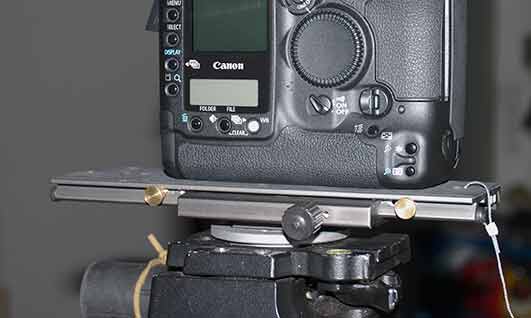
The only nasty point is the correction of the distortion. Here's a shot of the set-up:
http://imago.macbay.de/montespluga/flatstich1.jpg
I can see your point about using only the sweet parth of a lens; therefore using the 20 D.....
What do you intend by >Because you can correct geometrical ABBERATIONS of the lens only with Photoshop-plugins.< exactly?
Some plugins, as Lensfix or Lenscorrector can fix distortions; but usually not on shiftlenses. But I'm trying to figure out to implement the sensor's offsett, aka the lens shift, in its corrections, using the x/y-coordinates.
regards to DD
edit: I see your edit now; I know the "classical" stiching, but try to avoid it...
So you'd say better using a CZ-28 - within a classical stiching methode...
Bart_van_der_Wolf
April 12th, 2007, 07:08 AM
Some plugins, as Lensfix or Lenscorrector can fix distortions; but usually not on shiftlenses. But I'm trying to figure out to implement the sensor's offsett, aka the lens shift, in its corrections, using the x/y-coordinates.
Yes, the only way to correct the geometrical aberrations (assumes the center or the image equals the center of distortion) in a shifted lens is by adding blank space to the image file in proportion to the shift-offset, or use software that allows to set/determine the offset for each file (I know Hugin and PTAssembler allow to do the latter).
Bart
Klaus Esser
April 12th, 2007, 07:16 AM
geez, Klaus
a 60 shot-pano, must be fun ;-)
Id' lke to use shiftlenses, as they' re easy to handle when doing the shots; look
With that tecnique, the nodal point is respected; one can mount the shots manually in PS, as well, it fits.
The only nasty point is the correction of the distortion. Here's a shot of the set-up:
I can see your point about using only the sweet parth of a lens; therefore using the 20 D.....
What do you intend by >Because you can correct geometrical ABBERATIONS of the lens only with Photoshop-plugins.< exactly?
Some plugins, as Lensfix or Lenscorrector can fix distortions; but usually not on shiftlenses. But I'm trying to figure out to implement the sensor's offsett, aka the lens shift, in its corrections, using the x/y-coordinates.
regards to DD
edit: I see your edit now; I know the "classical" stiching, but try to avoid it...
So you'd say better using a CZ-28 - within a classical stiching methode...
Hello Michael!
The point is the axis of the lens. In your setup the lens is fix and the back (chip) moves - or vice versa.
This means, the angle of the lens is stressed up to the extremes. When you shift outside of the lens-axis, the quality of the lens decreases. Your lens is first-class - but also has given limitations closer to the edges. And youīll reach the edges faster than you may think by shifting for the purpose of stitching for wideangle.
Therefore i found - not only with may 20D, but also with my 1Ds and any other of my cameras - itīs better not to use them in the outer ranges of the lens-angles and to do stitches better by rotating the camera/lens arround itīs NPP using a speciallized head to exactly (!) adjust the NPP/Nodal-point.
Doing that and shooting symmetrical rows it is possible to handle it all just like a COMMON shift or tilt-correction.
This way you can absolutely correct ditortions just like you can with a view-camera. I had an adapter-plate to put my 1Ds onto a 4x5" view-camera and made several shots by shifting the back up and down. This worked well - but not with superwide-angles. Here - besides of vignetting by the adapter-plateīs cameramount - the problem was that you unavoidably reach the outer regions of a lenses circle. And then distortions and CAs rise - unavoidably.
best, Klaus
P.S. i should point out, that my aim isnīt only wide angles but also high resolutions. The shown b/w example has about 70MPx.
hereīs another example of wideangle/highres shot by stitching 5 rows of 6 shot each row an planarprojection (2MB-File) - the original file has app. 85Mpx:
http://www.klausesser.de/EhrvKl.JPG
http://www.klausesser.de/EhrKl.JPG
Bart_van_der_Wolf
April 12th, 2007, 08:03 AM
P.S. i should point out, that my aim isnīt only wide angles but also high resolutions. The shown b/w example has about 70MPx.
Klaus, I fully agree that the increase in resolution is something that is hard to achieve for the money one has to invest, that's why I like stitching so much. In fact, some subjects (http://www.xs4all.nl/~bvdwolf/main/downloads/BerlinerDom.jpg) can be shot handheld (in this case 6 images +1 to remove a pole) with relatively simple cameras (a Powershot G3 in this case). The stitched example is shown at a size reduced to 1/3rd in both dimensions.
hereīs another example of wideangle/highres shot by stitching 5 rows of 6 shot each row an planarprojection (2MB-File) - the original file has app. 85Mpx:
http://www.klausesser.de/EhrvKl.JPG
Your example, if you don't mind my pointing it out, suffers a bit from 'ghost clouds' (it makes me dizzy). I use SmartBlend (http://smartblend.panotools.info/index.htm) (as a plug-in for PTAssembler) for the final blending of the partial images, and it deals with those issues quite well automatically.
Bart
Klaus Esser
April 12th, 2007, 08:47 AM
Your example, if you don't mind my pointing it out, suffers a bit from 'ghost clouds' (it makes me dizzy). I use SmartBlend (http://smartblend.panotools.info/index.htm) (as a plug-in for PTAssembler) for the final blending of the partial images, and it deals with those issues quite well automatically.
Bart[/QUOTE]
Hi Bart!
Yes - but itīs not the blender (i used multiblend because of fine details), but the bracketing. The clouds moved fast and 3 exposures take their time even itīs only some seconds . . ;-)
Maybe i should work it over a little . .
I tested a lot with multiblend an smartblend - Alexandre told me that multiblend is a bit better with fine details while smartblend is smoother. I like smartblend better - though indeed with lots of fine details multiblend keeps sharper details. Both are very good!
Your Berlin Dome is very fine! I did a lot of handheld too - no problem with AutopanoPro. I even did some spherical handheld - hereīs one, about 60 shots:
www.klausesser.de/PlatzVR.htm
best, Klaus
Michael Fontana
April 12th, 2007, 09:48 AM
Yes, the only way to correct the geometrical aberrations (assumes the center or the image equals the center of distortion) in a shifted lens is by adding blank space to the image file in proportion to the shift-offset, or use software that allows to set/determine the offset for each file (I know Hugin and PTAssembler allow to do the latter).
Bart
Hey, it works!!
after getting the mail back from Lenscorrector's support - they are very friendly and helpfull, - concerning the setting of the offsett; I did recalibrate the lens, with the offsett correction, and it works!!
http://imago.macbay.de/OPF/lenscorrected.jpg
It's not perfect yet; I rather made a quick and dirt test, with some incamera-jpgs I had...just to look, if it's working.
So here's the howto, stitching for dummies ;-)
Shifting the lens 10 mm left, 00, 10 mm to the right.
Correcting the distortions with Lenscorrector, after applying the following rule for the calibration, from Lenscorrector support:
> Shift lenses can be calibrated using the xc and yc parameters. xc and yc are
measured in half image widths, i.e. the image with is 2.0.
So a shift of 5 mm if the sensor is 20 mm means a shift of 0.5.<
Merging them in in PS, or a pano- app.
Great! I had been looking fo that since years, as I very rarely need bigger files than A-3/300, so this is a easy way, to get a bit more resolution...
Shiftstitches or flatstitches have the advantage to be taken fast; which avoids ghosting, by clouds or by people etc.
So the yellow screws of my setup (linked photo) will shift the cam for 10 mm, only....
Klaus; the Schneider PC-28 has its limits, definatly; and some different copies are arround, too. The mine doesn't seems to be a bad copy...but CA can be a problem with it. And I agree, there's a difference from it to the 80 MP-stitches.... So here's my next question: how long does it takes, for one of these big pano's, incl. shooting time? Wouldn't it be easier to rent a Hassi with a back?

Klaus Esser
April 12th, 2007, 11:12 AM
"So here's my next question: how long does it takes, for one of these big pano's, incl. shooting time? Wouldn't it be easier to rent a Hassi with a back?>
hello Michael!
I often rent a digiback for one of my Hasselblads - i mainly use a Leaf Aptus on a EXL. Thatīs when i shoot people for advertising or a H2 for action-like shootings.
But to be honest: i like shooting analogue better. On 6x6/8 or even 35mm. Itīs another feeling.
Sometimes i shoot portraits and testimonials on 4x5" or even 8x10". Some clients love it.
Even the Aptus in combination with a 120mm Macro-Planar on a Hasselblad canīt give me the resolution of a bunch of shots stitched from 1Ds or even 20D shots.
Of course that only works with non-moving objects.
Using smartblend and take care of moving clouds while bracketing ;-) (iīll overwork it with blurr at the edges) thereīs definately more advantages as there are disadvantages.
The time to shoot a 80MPx stitch with 5 rows for wideangle is about 8-10min.
If that is too long i can use one of my 6x6, 6x7, 6x9, 6x12, 6x17, 4x5, or 8x10 cameras . . . :-) :-) and do it in a fragment of time . .
But i think, we are here not in an exclusively professional forum and therefore i think it is wiser to talk about doing fine pictures in highres at a cost, any amibitioned hobby-photographer can affford.
And thatīs definately not the case with a "Hassi with a back" which is about 40grands . . ;-)
When i take photographs for myself and experimentally i wouldnīt spend about 400 a day to rent an Aptus . .
best, Klaus
Bart_van_der_Wolf
April 12th, 2007, 04:01 PM
... itīs not the blender (i used multiblend because of fine details), but the bracketing.
I understand. I use Photomatix Pro for HDR tonemapping and blending. The recent 2.4 version has the capability to suppress movement between bracketed shots with the creation of HDR files. It works quite well.
Bart
Klaus Esser
April 12th, 2007, 04:21 PM
I understand. I use Photomatix Pro for HDR tonemapping and blending. The recent 2.4 version has the capability to suppress movement between bracketed shots with the creation of HDR files. It works quite well.
Bart
hey Bart!
Yes - but thatīs for aligning images when the camera moved a little while bracketing, not for parts IN the images ;-)
Iīll correct it in PS.
best, Klaus
Bart_van_der_Wolf
April 12th, 2007, 04:29 PM
hey Bart!
Yes - but thatīs for aligning images when the camera moved a little while bracketing, not for parts IN the images ;-)
Photomatix Pro 2.4 does not only align the images, it also avoids ghosts due to movement, automatically! There are several settings possible, movement suppression (in 2 degrees of severity), and ripples on water surfaces.
Bart
Klaus Esser
April 12th, 2007, 05:45 PM
Photomatix Pro 2.4 does not only align the images, it also avoids ghosts due to movement, automatically! There are several settings possible, movement suppression (in 2 degrees of severity), and ripples on water surfaces.
Bart
Hey Bart!
HELL - i forgot to upgrade . . . :-) ! Still have Pro2.2 Thanks!
best, Klaus
Asher Kelman
April 12th, 2007, 06:45 PM
Bart,
Will Photomatix Pro align leaves trhat get moved an inch?
Asher
Michael Fontana
April 13th, 2007, 02:50 AM
Hard to tell, Asher
with leaves, I found it sometimes difficult to avoid "ghosting"
Usually in Photomatix Pro I use 3 or 5 images; so depends all how much the leaves are moving, within one exposure, too. But the other day, it matched even a tree with expositions about 10 secs as longest shot.
Klaus: Photomatix' upgrade has some improved features, as gammaslider, etc...
This app is very well supported and maintained.
Bart_van_der_Wolf
April 13th, 2007, 03:02 AM
Will Photomatix Pro align leaves trhat get moved an inch?
YES, leaves and branches, cars and people, and waving grass ghosts are removed/reduced, and it works with ripples on water surfaces (I'm curious what it does with waves). I don't think it is done by local realignment, but rather by taking (perhaps) a sort of median or weighted mean of the different bracketed exposures after general image alignment and exposure alignment.
It may help to have more bracketed exposures than 3, I have yet to test that because I usually take 7 bracketed exposures (through a Personal Function on my 1Ds2) with approximately 1.33 EV difference (exact setting depends on scene contrast) between them. I assume that the smaller EV difference may also benefit the ghost removal.
Bart
Michael Fontana
April 13th, 2007, 03:29 AM
Bart: EV differences 1.3 does make sense, as I'm often switching between 1 and 1.5....
>waving grass ghosts are removed/reduced< True, but sometimes beeing blury. I couldn't figure out, how it really worked, but one might ask on the HDR-photo mailing list: http://www.hdr-photography.com/pipermail/hdr-photo
Klaus: You forget to mention, how long the entire stitch takes, including all...
Klaus Esser
April 13th, 2007, 05:09 AM
Hard to tell, Asher
with leaves, I found it sometimes difficult to avoid "ghosting"
Usually in Photomatix Pro I use 3 or 5 images; so depends all how much the leaves are moving, within one exposure, too. But the other day, it matched even a tree with expositions about 10 secs as longest shot.
Klaus: Photomatix' upgrade has some improved features, as gammaslider, etc...
This app is very well supported and maintained.
Hey Mike, Bart!
Shame on me :-) - i didnīt realize that 2.4 is out. I was using 2.2.2 - and didnīt care much with aligning to be honest . . :-) . . am used working it over afterwards in PS.
But i tested it at once last night and i must say: it works well!
Thanks again - i donīt know when i would have realized it . . :-) :-)
best, Klaus
P.S.: Michael, the stitching takes mostly arround 15min. Editing about 10min and rendering depends on the size. Rendering of the 80MPx-picture of the cubical building with Spline64 and smartblend as TIFF/16bit took about 20-30min on my Mac - i didnīt control the time exactly.
Time depends heavyly on the machine you use and the space on the partition you reserve for APP.
APP supports my double-processor MAc and supports up to 8 CPUs and i think cores also.
Great program!
best, Klaus
Michael Fontana
April 13th, 2007, 05:43 AM
Now, you' re teasing me, Klaus ;-)
I had been using/playing arround with other pano-apps, and spend a lot/to much of time, to get it done; therefore I didn't used it regulary. But I saw yesterday, that APP uses all 4 cores of my Quad....
a Distagon 28 on FF would produce - as a one row-stitch, imcluding 5 shots - a image having 110 x 65 degrees...
The nodal point should be corrected for 107.5 mm
Klaus Esser
April 13th, 2007, 07:35 AM
Now, you' re teasing me, Klaus ;-)
I had been using/playing arround with other pano-apps, and spend a lot/to much of time, to get it done; therefore I didn't used it regulary. But I saw yesterday, that APP uses all 4 cores of my Quad....
a Distagon 28 on FF would produce - as a one row-stitch, imcluding 5 shots - a image having 110 x 65 degrees...
The nodal point should be corrected for 107.5 mm
;-)
did you do a 110degree rendering? Iīd be interested in the quality of the outer regions! Itīs interesting - the kind of rendering has a big influence in that. At such big angles, i prefer to render at max. 50% - because the plan-projection sometimes produces similar problems as extreme shifting does and decreasing the size of the final-rendering as planarprojection diminshes visual problems in that regions.
At the moment iīm testing a way to photograph one picture with two lenses: a 20mm for the inner regions and a 50mm for the outer regions (of course a bigger amount of pictures to fill in). The effect is, the stitcher/renderer doesnīt have such extreme projection-corrections to outer edges while rendering a planar projection.
A friend of mine does it this way - heīs working with APP quite a longer time as i am. And itīs workin very well.
best, Klaus
Michael Fontana
April 13th, 2007, 09:52 AM
No time yet....
I only calculated the possible angle.
And off course you' right about the outer regions week aspect.
But heck, I'm not a dedicated UW-shooter. On the 4/5, I rarely went wider than 65 mm, loving the 90 or 120....
So, If the distagon works fine for a 90 or 100 deg-angle, I'd be pleased.
Klaus, did you ever had the PSA from Zörk? It gives a pretty outstanding files, at 65 x 42 cm/300; I sometimes use it with Hassi lenses, for (architecture) modell shots, too. On the 80mm, distortion isn't a problem, but as I found out how to correct distortion of the shiftet lenses; I'll try that 50 mm first; here's a test with it:
http://imago.macbay.de/montespluga/PSA_1Ds2.jpg
maybe some jaggies, through downsampling....
Klaus Esser
April 13th, 2007, 01:52 PM
No time yet....
I only calculated the possible angle.
And off course you' right about the outer regions week aspect.
But heck, I'm not a dedicated UW-shooter. On the 4/5, I rarely went wider than 65 mm, loving the 90 or 120....
So, If the distagon works fine for a 90 or 100 deg-angle, I'd be pleased.
Klaus, did you ever had the PSA from Zörk? It gives a pretty outstanding files, at 65 x 42 cm/300; I sometimes use it with Hassi lenses, for (architecture) modell shots, too. On the 80mm, distortion isn't a problem, but as I found out how to correct distortion of the shiftet lenses; I'll try that 50 mm first; here's a test with it:
maybe some jaggies, through downsampling....
Hi Michael!
Looks good!
No - i never had that Zörk. I use a 4x5" view (Linhof) or a field (Wista) camera for architekture with shift. Or sometimes a SWC or a 6x9 Silvestri. Sold the Silvestri and bought the Wista instead. Iīm just selling the SWC also - too much limitations. I can do it with my 6x12/17 camera more flexible.
best, Klaus
P.S.: how did you scan the shot?
Michael Fontana
April 13th, 2007, 02:41 PM
P.S.: how did you scan the shot?
Which scan?? They' re just screenshots: (apple+shift+4)