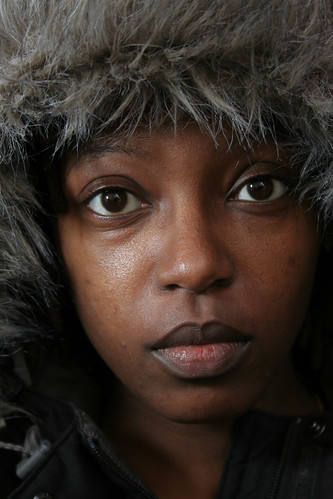
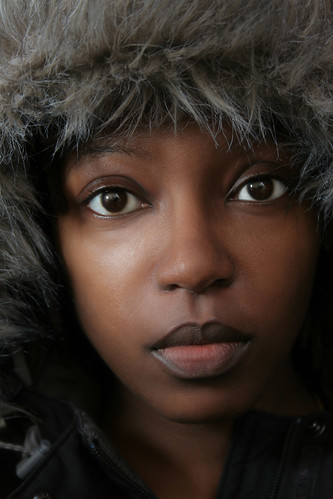
View Full Version : TIPS & TRICKS No. 2 - Retouching Skin
Tim Armes
April 22nd, 2007, 11:55 PM
This thread is part of the Tips & Tricks problematics. See here (http://www.openphotographyforums.com/forums/showthread.php?t=2674) for more information.
Hi all,
We often have questions concerning skin retouching, so I thought it would be useful to try to collect our ideas together into a single thread.
If you have any skin retouching tips that you'd like to share, then please post them to this thread. As usual, accompanying photos would be appreciated.
Regards,
Tim
Steve Saunders
April 23rd, 2007, 01:49 AM
I recently bought Portrait Professional and I have to say that it does a stunning job in really fast time.
Tim Armes
April 23rd, 2007, 02:00 AM
Hi Steve,
I think that plugins and so forth can be a great time saver. Kodak also produce a portrait plugin that produces excellent results.
However, where we can suggest methods that just use Photoshop we learn techniques that help to grow our overall retouching skills. To become competent at retouching it's important to understand how certain methods work, and why some techniques produces better results than others. With this understanding we can better adapt the techniques we know to any photos that come our way...
Tim
Asher Kelman
April 23rd, 2007, 04:42 PM
Thanks tim for bring this up. Who is going to kick off?
What about acne and red skin?
or harsh shadows
or harsh highlights?
Asher
Steve Quattrocchi
April 23rd, 2007, 05:25 PM
I guess this opens up the whole "correct" skin color debate. As an example I recently shot a couple with their new baby in natural light. There was a lot of green in the shadows due to the trees and grass outside the window reflecting green light into the room.
I removed the green cast which gave a more pleasing skin tone, but one which was not accurate to the scene shot.
having said all that I would love pointers on skin tone workflow as well. Don't really have any of my own unfortunately.
Theo Wallis
April 24th, 2007, 05:46 AM
As posted in another thread on this site (a tutorial from another forum I found while Googling)
http://photography-on-the.net/forum/showthread.php?t=171753&highlight=airbrush
Ian Farrell
April 24th, 2007, 02:09 PM
Will try and put something together on how I've retouched skin, but in the meantime I thought I should pass on the best piece of advice I've every had: take your time.
Any quick fixes will always look like quick fixes, in my experience. Those I've spoken to in the professional retouching trade spend hours on a shot - sadly not something everyone has time for.
Just my 2p.
I.
This thread is part of the Tips & Tricks problematics. See here (http://www.openphotographyforums.com/forums/showthread.php?t=2674) for more information.
Hi all,
We often have questions concerning skin retouching, so I thought it would be useful to try to collect our ideas together into a single thread.
If you have any skin retouching tips that you'd like to share, then please post them to this thread. As usual, accompanying photos would be appreciated.
Regards,
Tim
Kathy Rappaport
April 24th, 2007, 02:22 PM
I was at the WPPI tradeshow (Wedding and Portrait Photographers) and there were so many products out there, I bought NONE! And my question is still what is the correct color of skin?
I have some photos up on my pbase site that the portrait does represent the person's actual skin tone - which appears to be orange because he does a spray on tan. When I corrected it, he complained! (he thinks he looks good ORANGE and who am I to tell him otherwise!)
nyschulte
May 1st, 2007, 03:21 AM
Hello,
My starting point was this tutorial
retouchpro tutorials (http://retouchpro.com/tutorials/?m=show&id=209)
Here is one of the results:
http://www.photoneckel.eu/cpg/albums/people/portraits/pascale/_D211275.jpg
http://www.photoneckel.eu/cpg/albums/people/portraits/lyn_new/_D213230.jpg
I do not use step 4 anymore as i overdo it mostly:
http://www.photoneckel.eu/cpg/albums/projects/fola_07_08/_D200039_brd.jpg
After this i do some work on the eyes.
http://www.photoneckel.eu/cpg/albums/people/portraits/christine/_D213396.jpg
I still have to improve a lot but the general look pleases me.
I need to concentrate more on details like stray hair and of course taking more time to work on each picture. These pictures were retouched in about 30 minutes each.
I tried as well the portraitprofessional and while having some good looking results, i prefer the manual approach.
Nicolas
John_Schwaller
July 1st, 2007, 09:27 PM
See action at: http://forums.dpreview.com/forums/read.asp?forum=1006&message=23435116
It's easy and works great.
John
Asher Kelman
July 1st, 2007, 11:23 PM
I may try it tomorrow. Looks interesting.
Thanks John for sharing. Maybe you or someone else could show us how it works with screenshots from the time you paint with white!
Asher
John_Schwaller
July 2nd, 2007, 12:01 PM
I may try it tomorrow. Looks interesting.
Thanks John for sharing. Maybe you or someone else could show us how it works with screenshots from the time you paint with white!
Asher
Actually, the usage is pretty intuitive. You paint the skin white, masking the normal areas you don't want "unsharp", such as eyes, lips, nostrils, eye brows, etc. The play and follow the instuctions.
I have not done acomparison, but I believe it incorporates a lot of the technique show in this exerpt (http://www.photoshopsupport.com/photoshop-blog/dl-blog/skin-1/Skin_Varis_202-215.pdf) from 'Skin: The Complete Guide to Digitally Lighting, Photographing, and Retouching Faces and Bodies' by Lee Varis.
With the book came some sample files. I did a quick 5 min. alteration of one of them with Springer's action. Here is before & after (I hope Lee doesn'y mind my posting them).
Before:
http://www.pbase.com/jrschwaller/image/81551635/large.jpg
After:
http://www.pbase.com/jrschwaller/image/81551634/large.jpg
Ooops...didn't convert to sRGB...please excuse the color tones
John
Asher Kelman
July 2nd, 2007, 02:53 PM
Hi John,
I have an approach that is governed by a wish to appear as little deceptive as possible in image editing. IOW, not to give a look of being altered. To that end, I make the best possible change and then do something else and fight to donate as much of the color corrected original as I can without throwing away the retouch work.
So here, could you possibly take the final image and add back as much of the orginal image as you can without throwing away most of the improvements? Also, add the © photographer to the pics next time you post them as we like to give a clear credit.
It would be better in future if we used our own pictures :).
If someone is a Lee Varis fan, we'd love to see how he renders the skin his way.
Thanks for sharing the contact to Lee Varis and the results you have obtained with CSpringer's Skinfix action action.
Maybe we should find some standard files we own for this kind of work!
Asher
John_Schwaller
July 2nd, 2007, 10:32 PM
Asher...
I suggest you just try the Springer action. It is really self explanatory and much easier than any attempt by me to document it....or reverse engineer it, which is what it seems you asked for....you have full control over the effects as you go through and can also vary opacity on much of it.
The Lee Varis steps are fully documented in the extract which I gave you the link. Suggest you read that also. It is really "cookbook".
John
Asher Kelman
July 2nd, 2007, 10:53 PM
Yes of course! These are easy to play with. Just thinking we should make avaialble standard files for this work so we don't have to worry about permissions.
Asher
Don Ferguson Jr.
July 2nd, 2007, 11:47 PM
This is one off P.O.T.N. Canon forum in the Glamour and **** forums . Paul Ferradas gave members a nice link of a tutorial where he says :
''The great thing about Dust and Scratches is that you control how much skin detail is retained where as if you are applying the gaussian blurr effect, it's essentially blurring all the pixels and not considering the underlying textures.''
http://www.ferradasphotography.com/skinsosoft/
It is one I bookmarked .
Regards
Don
John_Schwaller
July 3rd, 2007, 06:36 AM
This is one off P.O.T.N. Canon forum in the Glamour and **** forums . Paul Ferradas gave members a nice link of a tutorial where he says :
''The great thing about Dust and Scratches is that you control how much skin detail is retained where as if you are applying the gaussian blurr effect, it's essentially blurring all the pixels and not considering the underlying textures.''
http://www.ferradasphotography.com/skinsosoft/
It is one I bookmarked .
Regards
Don
Don......Thanks for another alternative.
From looking at the tutorial, it is not clear to me that D&S blurs and less than Gaussian (though at the beginning of the article he makes a point of this).
It seems, as in most techniques, the control is in the opacity of the brush and/or layer.
I know there are differences in blurs...for example between Gaussian and lens blur. Can anyone distiguish the differences with D&S?
John
Gary Yelland
July 6th, 2007, 02:33 PM
I prefer not to use blurring techniques on skin as this destroys the pore structure.
I have used this tutorial many times for commercial use and its really fast once you get used to it,
the idea behind is to half the contrast and double the pore structure for a small area at a time using the patch tool, this gives great results.
Skin Smoothing technique (http://www.roge.ru/?page_id=104)
Give it a try.
Asher Kelman
July 6th, 2007, 04:50 PM
I like Igor Abramov's explanations. He explains in a simple way, and since he leaves out the definate article, "the", I can even hear his Russian accent and it's charming!
He likes the healing brush but cautions against the disorder caused by mismatch of skin pore pattern when the patch is faded and part of the orginal is showing through.
Asher
Tim Armes
July 9th, 2007, 05:46 AM
I prefer not to use blurring techniques on skin as this destroys the pore structure.
I have used this tutorial many times for commercial use and its really fast once you get used to it,
the idea behind is to half the contrast and double the pore structure for a small area at a time using the patch tool, this gives great results.
Skin Smoothing technique (http://www.roge.ru/?page_id=104)
Give it a try.
That's a great tutorial Gary. Thanks for the link.
Chip Springer
July 17th, 2007, 08:42 PM
Actually, the usage is pretty intuitive. You paint the skin white, masking the normal areas you don't want "unsharp", such as eyes, lips, nostrils, eye brows, etc. The play and follow the instuctions.
I have not done acomparison, but I believe it incorporates a lot of the technique show in this exerpt (http://www.photoshopsupport.com/photoshop-blog/dl-blog/skin-1/Skin_Varis_202-215.pdf) from 'Skin: The Complete Guide to Digitally Lighting, Photographing, and Retouching Faces and Bodies' by Lee Varis.
With the book came some sample files. I did a quick 5 min. alteration of one of them with Springer's action. Here is before & after (I hope Lee doesn'y mind my posting them).
John
Hi John,
Thanks for recommending my action. I did notice that it looks like you added other edits so I thought you might appreciate what I came up with with just the action and USM. The last one is a 100% crop. Notice how it doesn't blur the hairs like other plugins do.
http://img.photobucket.com/albums/v203/mcennis3/CSpringerSkinRepairg.jpg
http://img.photobucket.com/albums/v203/mcennis3/CSpringerSkinRepairpaul.gif
http://img.photobucket.com/albums/v203/mcennis3/CSpringerSkinRepairx2.gif
Asher Kelman
July 17th, 2007, 10:08 PM
Hi John,
Thanks for recommending my action. I did notice that it looks like you added other edits so I thought you might appreciate what I came up with with just the action and USM. The last one is a 100% crop. Notice how it doesn't blur the hairs like other plugins do.
Thanks for joing us and posting here. You are so welcome!
Could you explain how is it that your action protects hair? Is that just the masking layer?
Also how much is related to Lee Varis' technic quoted by John, below
I believe it incorporates a lot of the technique show in this exerpt (http://www.photoshopsupport.com/phot...is_202-215.pdf) from 'Skin: The Complete Guide to Digitally Lighting, Photographing, and Retouching Faces and Bodies' by Lee Varis.
Asher
Chip Springer
July 18th, 2007, 12:08 AM
The first step is to paint over the skin so you are not actually editing the entire picture...in that sense, yes, there is a mask. Why it doesn't effect facial hair the same way a Portraiture type plugin does I couldn't say...I guess it is the settings I'm using.
I get a URL not found on the link you posted so I don't know what technique is used.
Ray West
July 18th, 2007, 07:10 AM
This is a personal view, but I think the amount of processing I see on many portrait images, instead of making the subject look younger, makes them look dead. Just what is wrong with nature? What is in folk that wants them to look plastic, wax work, lifeless?
There should be some trading standards to be applied, false descriptions, etc. ;-)
Best wishes,
Ray
Chip Springer
July 18th, 2007, 09:32 AM
This is a personal view, but I think the amount of processing I see on many portrait images, instead of making the subject look younger, makes them look dead. Just what is wrong with nature? What is in folk that wants them to look plastic, wax work, lifeless?
There should be some trading standards to be applied, false descriptions, etc. ;-)
Best wishes,
Ray
I agree and prefer the skin texture but obviously many love the plastic look. This gif shows how the action leaves the texture without blurring better than most of my examples. The action will also get get rid of the wrinkles using the Healing tools or add texture if needed (I added a bit to the nose only).
http://img.photobucket.com/albums/v203/mcennis3/CSpringers-Skinfix.gif
Asher Kelman
July 19th, 2007, 12:03 AM
This is a personal view, but I think the amount of processing I see on many portrait images, instead of making the subject look younger, makes them look dead. Just what is wrong with nature? What is in folk that wants them to look plastic, wax work, lifeless?
Well Ray,
We are not going to cross swords, but let me tell you my perspective. There's skin; babies skin, a whore's skin, a virgin's skin, acne skin, aged skin leather, the weathered leathery skin of saliors, gardeners, the homeless, Irish poets and highwaymen. As artists we can document them exactly as they are or as we romanticise their conditon.
But, apart from that, pictures of women to be seen by women are different! In fact so different that billions of dollars can be earned catering to this. This is good to understand if one chooses to feed from this.
So what are women after?
When women look at the pictures of models in magazines, they want something more dreamy than they get when they look in the mirror. Their wish is to escape to fantasyland. They are willing to spend their money to wonder how they might look if they had the money or spent the money on the make up, hair style couture etc! This is a woman's escape from ordinary truths of their mundane office or cooking routines to a perfect pampered dreamworld for just $5.00 a copy of a magazine.
Now we could have a separate accurate book with zits, moles, pimples, lines, rolls of flesh, narrow eyes and hair on the lips and even make actions to increase then so the iomages are even more "natural" and then it would be bought by you and I and 7 others. The advertizing for warm socks and alka seltzer and hemorrhoid cream might make it a good buisiness if we just give the magazines away to old age homes. They can't focus anyway to well anyway.They'll think it's Vogue!
There should be some trading standards to be applied, false descriptions, etc. ;-)
Well, Ray, in one famous Hong Kong landmark case, a buisness man challenged his beautiful model socialite "trophy" wife with infidelity since the snub-nosed new born couldn't have been sired by him, it was far to ugly.
Well, a detective cracked the case. She had had nose, lipe and eye surgery, breast implant and more. He's marries a fraud. So he sued for breach of contract and fraud and won!
He didn't ask for custody of the child!
Yes, that is fraud but smoothing over skin a little for a client is no different than one having a nice shirt to cover your hairy chest and perhaps a few moles! A picture is only a representation, a container for memories and fantasies, not a cold mirror.
Asher

Meghan Robinson
March 23rd, 2008, 03:32 PM
i cant stand the plasticy, buttery face look that seems to be popular, and i wonder if its popular because of its look or because good retouching takes alot of time? im new to the retouching thing, but i think im pretty much never going to do the skin blur technique because i think its kinda scary. the example of my work that i included i think is very heavy retouching, but still looks like Skin, and not plastic. i think it took me about 2.5 hours, or maybe a little longer.
before:
http://farm4.static.flickr.com/3255/2313965945_2154f15629.jpg
after:
http://farm4.static.flickr.com/3062/2313970011_49080b342a.jpg
Cem_Usakligil
March 24th, 2008, 12:25 AM
Hi Meghan,
Welcome to OPF and thanks for showing this works of yours, which is impressive.
Would you please tell us how you did it? Thx
Regards,
Cem
Meghan Robinson
March 24th, 2008, 07:15 PM
i used the spot healing tool, some cloning, some very light airbrushing on a low opacity, and ummm. i think thats about it, just went very slowly, and thoroughly
David Thomasson
December 16th, 2008, 10:35 AM
For the past year or so I've been using Imagenomic Portraiture and am sold on it. If you do much portrait work, it's worth the price. Very flexible, auto-masking, etc. Before switching to Portraiture, I used the method describe here (http://i2.pbase.com/o1/mag/pbase_magazine_vol10_july2007.pdf) (see page 10) -- which can easily be built into an action with two stopping points, one for high pass adjustment, the other for G/blur.
Doug Kerr
December 16th, 2008, 04:38 PM
Hi, Asher,
Well Ray,
We are not going to cross swords, but let me tell you my perspective. There's skin; babies skin, a whore's skin, a virgin's skin, acne skin, aged skin leather, the weathered leathery skin of saliors, gardeners, the homeless, Irish poets and highwaymen. As artists we can document them exactly as they are or as we romanticise their conditon.
Then there's the recently infamous matter of ethnic skin and its beautification in post processing.
Carla is Cherokee, but we find that her skin is someplace between African American (Charlize Theron) and Pacific Islander (Nicole Kidman). We hardly know which sector of the ColorRight MAX to use.
Best regards,
Doug
David Thomasson
December 21st, 2008, 06:54 PM
i used the spot healing tool, some cloning, some very light airbrushing on a low opacity, and ummm. i think thats about it, just went very slowly, and thoroughly
I did this with Imagenomic Portraiture after touching out a few of the larger blemishes with the clone stamp. Took about two minutes.
http://img357.imageshack.us/img357/2026/brownskinfixsj9.jpg
Doug Kerr
December 21st, 2008, 09:09 PM
I did this with Imagenomic Portraiture after touching out a few of the larger blemishes with the clone stamp. Took about two minutes.
Wow! .
sherief mohamed
April 21st, 2010, 12:48 AM
nyschulte .. there is a better filters than this one ..
i think filter works well with old peoples skin .. fast retouching .. peoples who doesnt prefer alot of smoothing ... but i think for professional work the hand is the only way to retouch
Sandrine Bascouert
June 27th, 2010, 04:59 AM
Maybe it has nothing to do with that, but, when I used to do some studio shots, mainly food and objects, we absolutely wanted to get rid of what we called the "return" (don't know the word in English, simply made the translation) of the background color on the light areas/drop shadows of the main subject. At that time - no PS- we tried to avoid them when shooting, and cannot achieve it completely. Now, with digital retouching, sounds easy, but it's getting less realistic ; as for myself I got used to see these casts and they become part of the picture- as long as they are quite subtle. If you eliminate completely, I think it's getting weird. What do you think?
Sandrine Bascouert
June 27th, 2010, 05:05 AM
oups wanted to reply to this:
I guess this opens up the whole "correct" skin color debate. As an example I recently shot a couple with their new baby in natural light. There was a lot of green in the shadows due to the trees and grass outside the window reflecting green light into the room.
I removed the green cast which gave a more pleasing skin tone, but one which was not accurate to the scene shot.
having said all that I would love pointers on skin tone workflow as well. Don't really have any of my own unfortunately.
at the beginning of the thread sorry for that!
Asher Kelman
June 27th, 2010, 10:45 AM
Sandrine,
Glad to see this thread revisited. "Return" of other lights. in the French might be "spill" in the English terminology.
Asher
Sandrine Bascouert
June 27th, 2010, 10:49 AM
Thanks, time to upgrade my dictionary...
Asher Kelman
September 12th, 2010, 11:58 PM
Maybe it has nothing to do with that, but, when I used to do some studio shots, mainly food and objects, we absolutely wanted to get rid of what we called the "return" (don't know the word in English, simply made the translation) of the background color on the light areas/drop shadows of the main subject. At that time - no PS- we tried to avoid them when shooting, and cannot achieve it completely. Now, with digital retouching, sounds easy, but it's getting less realistic ; as for myself I got used to see these casts and they become part of the picture- as long as they are quite subtle. If you eliminate completely, I think it's getting weird. What do you think?
Sandrine,
This is an apt topic today! What is you practice today to prevent, so called, spill or "return". Interesting that they are mostly in the shadows from the main light and that's now obviously correct! I hadn't thought of that before.
Asher
Sandrine Bascouert
September 13th, 2010, 09:48 AM
I usually make a new layer with simply paint in the shadows with some color picked in the background, with opacity set at 5%ish (I found that it's especially noticeable on the hair eg: if you are standing under a tree there might be a very slight cast of green in your hair shadows, more likely if you are brunette) I absolutely don't know if I'm right, it's just the way I feel it. Depending on the background for studio pictures, and the background, the immediate surroundings and the quality of light for the rest.
Asher Kelman
September 13th, 2010, 09:52 AM
I usually make a new layer with simply paint in the shadows with some color picked in the background, with opacity set at 5%ish (I found that it's especially noticeable on the hair eg: if you are standing under a tree there might be a very slight cast of green in your hair shadows, more likely if you are brunette) I absolutely don't know if I'm right, it's just the way I feel it. Depending on the background for studio pictures, and the background, the immediate surroundings and the quality of light for the rest.
Sandrine,
I thought that the color in the shadows is coming from light from the background in the first place. So adding more would increase that color. Don't we need to neutralize it? an example might help.
Asher
Sandrine Bascouert
September 13th, 2010, 04:14 PM
I'll try to post one..What I said is that retouchers usually neutralize it so turn all things neutral...That what seemed odd to me. If you look at old 80's fashion photographs in open air you'll have that feeling that the background is real, and I thought that (surely I'm wrong) was because of the spill that was slightly present. It's the same as for example for cookware packshots where whenever you put a neutral gray background and filter the light or whatever I could possibly have been inventing there would always been that cast - only a few photons of color. One of my first job in photography was in a chef's magazine, as an assistant. The photographer used to turn on a small torch light from several meters away, just to add that fake sunlight spill and make the dishes more appealing, this is something that I've learned.
Sandrine Bascouert
September 14th, 2010, 01:50 AM
I forgot to delever an essential information...I do that (adding color)whenever I have to change the background in a comp. Of course there no need to add a cast if the shooting already contains the proper background with the spill...(and sometimes of course, in that case I got to reduce the spill) I hope it makes more sense :-)
Joachim Bolte
September 14th, 2010, 02:06 AM
I'd have to look it up, but I thought that a shadow consists of the complementary color of the light that is throwing the shadow, combined with the caustic light reflected from the object that is making the shadow. In the paintings of impressionist painters like Renoir, Cezanne and Monet you can see the application of this theory.
yellowish sunlight will cause a shadow with a bit violet in it. When the shadow is made by a red object, the parts of the shadow closest to the object will also have a bit of red in them. It's bound to be a very, very faint hint of color, just 'off-gray'.
Sandrine Bascouert
September 14th, 2010, 02:14 AM
http://i891.photobucket.com/albums/ac115/4personnen/brookeshields.jpg
Brooke shields 1981, I think theres a spill of the orange shirt on the cheek.
http://i891.photobucket.com/albums/ac115/4personnen/ekdrsgu2hvtlgs2k.jpg
Kelly le brock 1985 The red turban/dress reflects on the white wall
http://i891.photobucket.com/albums/ac115/4personnen/6394fc23dded.jpg
Pete Shelley 1981, there's spills everywhere I cannot count them..
All these images are copyrighted
There's no way one of these images could appear like that nowadays...I'm not talking about the quality of the reproduction (I myself owned Shelley's record and the cover was correctly printed)
maybe the scanner used to digitalize these images might have introduced a color but not selectively :-)
Sandrine Bascouert
September 14th, 2010, 02:33 AM
Here's the today's vanity fair images
The first one is Annie Lebowitz..
http://i891.photobucket.com/albums/ac115/4personnen/actors-directors-1003-11.jpg
Too neutral to me, looks a bit fake, I don't know why...
http://i891.photobucket.com/albums/ac115/4personnen/dianna-agron-00.jpg
apart from the smooth color cast applied consistently to the picture...
Asher Kelman
September 14th, 2010, 07:21 AM
Here's the today's vanity fair images
The first one is Annie Lebowitz..
http://i891.photobucket.com/albums/ac115/4personnen/actors-directors-1003-11.jpg
Too neutral to me, looks a bit fake, I don't know why...
http://i891.photobucket.com/albums/ac115/4personnen/dianna-agron-00.jpg
apart from the smooth color cast applied consistently to the picture...
Sandrine,
You're quite right!
From now on, I'll think of that too! As folk get more successful, they use retouchers more and more who build beautiful bodies and perfectly aligned clothes. The mistake, I see is that the b.g. has to show the presence of the objects, materials and people within as lit by the lighting in the space. Otherwise we get to sterile. I have my pictures for printing brochures and magazine advertisements cut out by retouchers routinely now. Care is taken with the shadows. We need to have the color of the shadows in a separate layer to use for composition in the new background.
Asher
John Kirby
September 15th, 2010, 08:19 PM
Sandrine and Asher,
Interesting to have this thread re-booted. With contemporary digital retouching we'd probably remove most of the spills from the Peter Shelley shot in Sandrine's post, from a standpoint of removing distractions or compositional improvement. Leaving some of them behind (perhaps toned down in a layer mask) would still help to tie the multitude of elements together, giving a near subliminal boost to the "reality" of the shot.
Digital capture has given us so much control. It's far too easy to overstep the line where the reality teeters; we've all looked at countless digitally manipulated shots feeling that they're not quite right and we can't put a finger on the reason why.
I'm constantly referring back to my original background layer to check for nuances of colour, reflection and shadow as I work on the layers above. It's all a matter of balance, which can be so elusive, regardless of your level of experience.
The old axiom that a well retouched photograph doesn't look as though it has been, is still so true.
It's all still good fun though!
John.
Asher Kelman
September 15th, 2010, 10:31 PM
I'm constantly referring back to my original background layer to check for nuances of colour, reflection and shadow as I work on the layers above. It's all a matter of balance, which can be so elusive, regardless of your level of experience.
Well John, my way of dealing with that is to take a break after each layer by working on a different picture and then when I return to aim to decrease whatever mathematical effect I've done by as large a percentage as possible. In the end, I always try to bring back, (where structurally possible), some of the original hues, even just 0.5%. This is to preserve some of the original mysterious essence that makes things seem real. Because as you point out:
"The old axiom that a well retouched photograph doesn't look as though it has been, is still so true."
Asher
John Kirby
September 16th, 2010, 08:27 PM
"my way of dealing with that is to take a break after each layer by working on a different picture and then when I return to aim to decrease whatever mathematical effect I've done by as large a percentage as possible."
Good point Asher. Walking away and coming back with fresh eyes is a good practice, as is cranking down the effect of whatever you've done. Unfortunately commercial deadlines will often put a dampener on this!
John.