View Full Version : Challenge: Ballroom dancing
ron_hiner
September 19th, 2007, 06:16 PM
Ok, I got invited to 'take a couple pictures' to a ballroom dance event in June. I'll always say 'YES' to dance photography.
It was in a hotel ballroom (but of course) and the light was terrible... no, I should say the light was beautiful... in those few place where it actually existed. Lucky I had a flash with me.
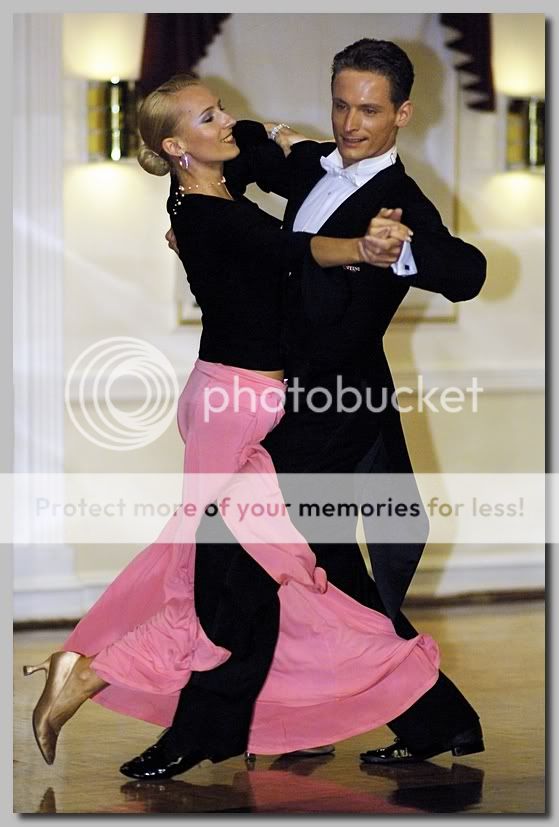
Here is pretty much what came out the camera that evening...
http://www.ronhiner.com/opf/opf_doreen_070608_182.jpg
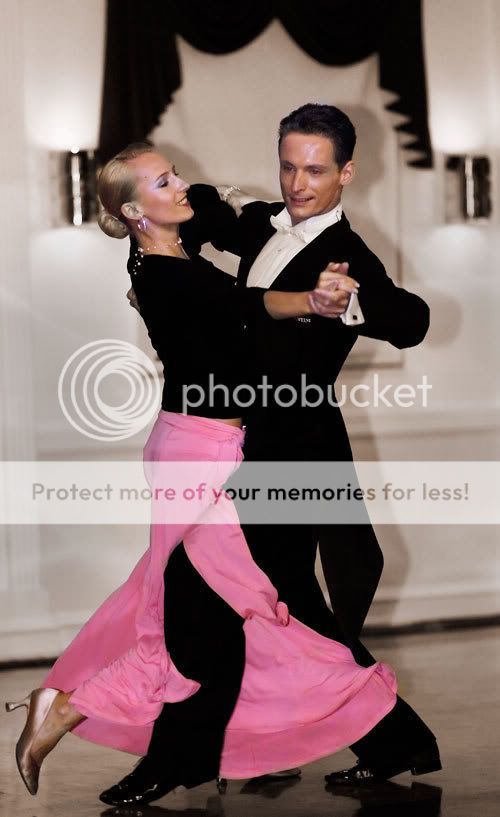
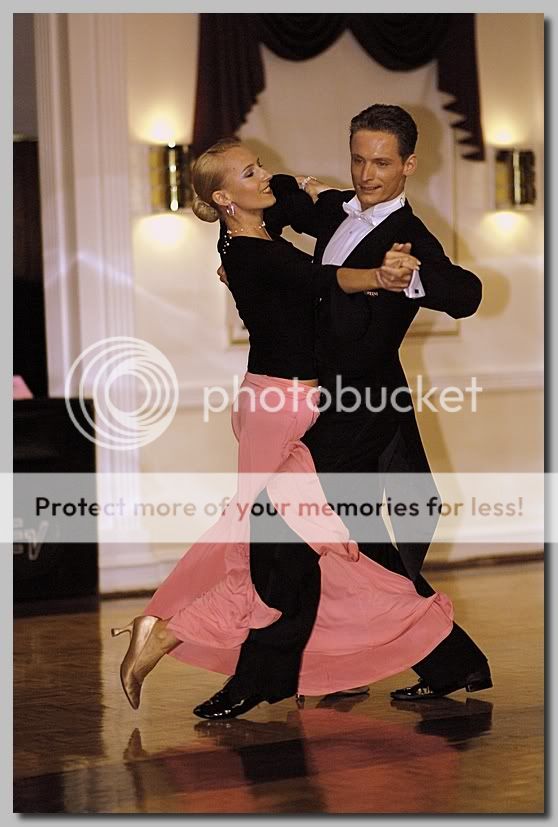
Here is my attempt to bring a nicer image out of those dreadful pixels...
http://www.ronhiner.com/opf/opf_doreen_070608_180.jpg
And here is a full size original... (only converted to jpg from raw) for anyone who wants to edit and repost... (6.3 MP download)
http://www.ronhiner.com/opf/opf_doreen_070608_181.jpg
Any one up for the challenge?
Ron
Shot with Nikon D2x at 1/750 @ f1.4 ISO 800. Shot raw... conversion to JPG and all post processing done in Capture NX. No Photochop involved.
Giovanni Brembati
September 20th, 2007, 02:11 PM
Hi Ron,
the image is noisy (800 ISO), so I applied a denoise action, then I tried the following:
Midtone increase. I stopped just before the noise is noticeable.
http://img235.imageshack.us/img235/6307/opfdoreen070608181midea9.jpg
Shadow/HighLights
http://img223.imageshack.us/img223/2760/opfdoreen070608181shadhai0.jpg
P.S. the noise is well visible in the original size image.
Don Lashier
September 20th, 2007, 04:36 PM
Here's a quick dual (HDR) version, complete with sloppy masking :)
Ron, I actually like your first interpretation better.
- DL
http://www.lashier.com/images/temp/hiner-dance.jpg
Greg Rogers
September 20th, 2007, 07:43 PM
Getting my feet wet, bear with me! No idea if I like this;
http://i225.photobucket.com/albums/dd232/gcrogers817/for%20OPF%20SAVE/opf_doreen_070608_181OGCR-flat-v2.jpg
Intent;
Aside from the obvious underexposure and such, while fiddling I found the white balance, tones, whatever off, and the background annoying. Never tried a colour / sepia combo before, Not so sure.
Quick and dirty steps;
De-noise
Absurd mid-tone curve increase
Selective Dodge top 1/2 to lighten faces
Channel mixer to enhance skin tones (my eye, might be goofy)
Over-do saturation for effect
Convert to BW sepia
Selective layer mask to colourise intended selections
Finally, flatten and save for web in PS, resulting in total loss of saturation and intent. Another post elsewhere on that. Dumb newbies. (referring to self, of course)
Thanks for providing opportunity to experiment, Ron!
-Greg
Greg Rogers
September 20th, 2007, 08:14 PM
I'm sorry, I'm having some basic trouble editing my posts for some reason. I didn't mean to call the background "annoying". Allow me to change that to "difficult to work with", please.
Also, Ron, I like your conversion just fine. On second glance, one thing I've lost is the wonderful warm glow from the wall sconces.
-Greg
Rachel Foster
September 20th, 2007, 08:54 PM
Wow. That photoshop stuff looks like it's worth learning! Huh.
ron_hiner
September 20th, 2007, 09:53 PM
Wow. That photoshop stuff looks like it's worth learning! Huh.
Rachel - As far as I'm concerned, you don't have to learn photoshop, but you have to learn some pixel-level editor very well to correct bad photos like this one. Photoshop has a 95%+ market share (totally made-up number - probably too low), so there is tons of free tutorials out there making it easier to learn. My edited version did not use photoshop at all -- I used Nikon Capture NX. Once I was reasonably happy, I imported the image into Lightroom to sharpen and print.
Don -- you win for bringing the best skin tones out. Can you tell us more about the HDR technique you used? I use HDR sometimes with landscapes... I bracket 3 or 5 shots, pick the two or three best ones and merge them. You started with one lousy JPG. Tell us more!
Don, Giovanni & Greg... nice stuff all. I didn't mention how noisy a badly underexposed shot can be on a D2x at 800 ISO. You figured that out without my help! And everybody was kind enough not to ask why I shot it at 1/750 (I have no idea -- that actually surprised me because my max flash sync speed is 1/250. I must have switched to FP mode. Perhaps the wall sconces tripped up the meter.)
This is the version that I printed...
http://www.ronhiner.com/opf/FADS_070608_472_rwh.jpg
I went for a bit more color on the woman's hair... which works for me. I wanted to create some separation between her head and the background. And I found some detail in the black tones of the man's tux, but even though I brightened them up, they still did not print as anything but dead black.
I took a more artistic approach with the blur... not better, just different.
Greg... the background is very annoying... you can say that. If you could swap out a totally different background, what would it be?
Ron
Any other takers?
Rachel Foster
September 20th, 2007, 09:57 PM
Oh, Ron, I WANT to learn photoshop! If ever there was a clear demonstration of it value, this is it. I apologize if my very dry sense of humor was misleading. I'm quite impressed and motivated to learn it. (As soon as I learn to focus the camera right, I'm looking photoshop)
ron_hiner
September 20th, 2007, 10:31 PM
Oh, Ron, I WANT to learn photoshop! If ever there was a clear demonstration of it value, this is it. I apologize if my very dry sense of humor was misleading. I'm quite impressed and motivated to learn it. (As soon as I learn to focus the camera right, I'm looking photoshop)
No need to apologize...
Here's my fundamental problem with a scene like this... beautiful graceful dancers gliding around a dance floor with an amazing fluid motion. When I took this picture, I saw no background, no pixels, and no noise. (Evidently, I didn't see the light meter either!) What I saw was dancers!
That, unfortunately, is not at all what my camera saw. My camera saw a 12 million pixels of a lovely pair of industrial wall sconces and a lovely linen-white painted wall with two unfortunate black and pink blobs interfering with an otherwise perfectly lovely scene.
Our job is to make pictures of what we see -- not what the camera sees. It's always better and easier to get the camera to cooperate, but.. but sometimes you gotta take those pixels out into the back alley for a little further discussion after the camera has done its duty.
Ron
Greg Rogers
September 20th, 2007, 11:02 PM
Greg... the background is very annoying... you can say that. If you could swap out a totally different background, what would it be?
Hi Ron,
I didn't phrase that right, even with the second post. It's not annoying, annoying, it's difficult to work with and at first glance I thought distracting from your initial "oops" shot...and redo.
Not so sure I'd replace it with anything. The wall sconces work too well with the 50's "art-deco" look. IOW, the background adds value, IMO.
Your final version rocks. (I like pretending I'm young using hip terms). Perhaps I'm being a bit too picky, yet the long, vertical shadow at left, lower distracts (to me, just an opinion)...and you've (arguably) lost the balance of the two wall sconces with your crop. That said, my cropping skills leave a lot to be desired, so please take my 2 pence with a grain of salt!
Rachel: kudos to you for acknowledging the value of post-processing! As I often say, it's a balance between getting the shot right to begin with, and being able to manipulate it. Neither opinion / method is IMHO is entirely correct by itself (again, just my opinion), nonetheless we need to know how to do both...even if we are personally driven more towards one or the other.
Ron has posted a perfect example here. One of those rare "shot of a lifetime" shots where we screwed up. (Geez, I've never done that). This thread exemplifies the difference between "trashing it" and "what can I do with it?".
-Greg
Rachel Foster
September 21st, 2007, 07:24 AM
Well, I think I know one reason why people talk about photoshop so much and the "art" less (not necessarily here on OPF, by the way). Photoshop can be learned but the "eye" is more difficult to learn. So, it makes sense to talk about that which can be learned rather than something that may or may not be "you have it or you don't."
I'm learning.......
Barry Johnston
October 17th, 2007, 03:20 AM
and now for my humble attempt.
http://www.pbase.com/barryvj171/image/87384263/original.jpg
Regards,
Barry
ron_hiner
October 17th, 2007, 07:38 AM
I forgot about this tread... but there is a follow up...
The version that I printed made its way back to the dance studio. They loved it so much that they've hired me to do a series of shots for a calendar that they plan on giving out at christmas time.
There is a lesson in there somewhere!
Ron
Asher Kelman
October 17th, 2007, 05:24 PM
Has anyone mentioned, there's too little room for her thighs?!!!!
Asher
ron_hiner
October 17th, 2007, 06:45 PM
Asher...
Her dress is big and floppy... this shot was taken milliseconds after she kicked out with her right leg, and then retreated. The male dancer stepped in, while her dress was still out. So her dress wrapped around his leg.
So what would you do? Clone some of his pants pixels to make it look more like we would expect it to look?
As a retouching guideline I like to follow: make the picture look believable -- even if its not. So perhaps this is a situation where one should clone in some fake pixels to make an unbeliveable picture (albeit real) believable.
Ron
Asher Kelman
October 18th, 2007, 11:42 PM
Asher...
Her dress is big and floppy... this shot was taken milliseconds after she kicked out with her right leg, and then retreated. The male dancer stepped in, while her dress was still out. So her dress wrapped around his leg.
So what would you do? Clone some of his pants pixels to make it look more like we would expect it to look?
As a retouching guideline I like to follow: make the picture look believable -- even if its not. So perhaps this is a situation where one should clone in some fake pixels to make an unbeliveable picture (albeit real) believable.
Hi Ron,
Some purists would say it is what it is. However, a picture is meant to be some likeness and to me, at least, the thigh looks weird. I'd clone in some cloth to give her thigh width, or else try making his pany leg dimensional and adding a shadow from it to her leg to give some sense of depth.
The image is flat there and so it seems strange. I thought this was another dancer with an artificial limb. That amazed me since this was above the knee!!
Still some people are great athletes and learn to dance!
Asher
Lindsey Bradley
October 26th, 2007, 01:17 PM
Well, here's my attempt.
http://img147.imageshack.us/my.php?image=opfdoreen070608181lk7.jpg
(Sorry, I couldn't get the image to show up on this page. I'm not used to image shack ;3 )
Hmmm...I couldn't seem to get the colors any more realistic looking. I'll have to check out some HDRI tutorials! :)
Asher Kelman
October 26th, 2007, 01:30 PM
Hi Lindsey.
Good try but maybe the simplest thing to do is expand the pink cloth a little to the left so it looks like it could contain a limb!
Asher
Todd harrison
November 2nd, 2007, 05:05 PM
yeah I have to say the lighting it really dark. this could be one of your main problems. your edited picture looks like a glamor shot. it help a lot if you take a picture with proper lighting i know that is not always easy. but I think a glamor shot is out of the question. making the picture lighter is a better way to go. I do like what Barry Johnston did to the picture it the best one for sure. their is still very little light on the faces.
Fred Spencer
November 8th, 2007, 01:55 PM
Here's my attempt
http://i208.photobucket.com/albums/bb37/FredSpencer/opf_doreen_070608_181fs800.jpg
Barry Johnston
November 8th, 2007, 09:17 PM
I think you've done well Fred !! Yours is sharp and clear and quite smooth in comparison to mine. I think mine could do with a bit of lifting, it's a bit muddy....
Regards,
Barry.
Greg Rogers
November 9th, 2007, 08:42 AM
Much better than mine, as well. Well done, Fred.
-Greg
Fred Spencer
November 9th, 2007, 08:57 AM
Barry, Greg,
Thanks very much. It was processed very quickly in Picasa then resized, sharpened and drop shadow added in Faststone Image Viewer to post back on here. Two great free programs and the work took less time to do than the time it took for the two programs to open on my computer.
StuartRae
November 9th, 2007, 09:34 AM
Well, I may as well join in the fun.
The main problem IMO was the WB - makes the skin look a bit malerial - so I assumed the door frame (?) was white. Then I adjusted the shadows in Light Machine and sharpened (was it necessary?) with Focal Blade.
http://www.lakelandphotography.net/OPF/doreen-LM.jpg
Regards,
Stuart
Fred Spencer
November 9th, 2007, 10:22 AM
Stuart,
Nice blue door frame you've got there. I much prefer my pink one ;)
Nill Toulme
November 9th, 2007, 10:47 AM
Sorry I can't let this thread go by without pointing out that it is a prime example of the problems with on-camera flash, especially in portrait orientation without a bracket. Maybe just a pet peeve, but the thing that jumped out at me first and foremost about this shot is the flash shadow. Use of a bracket to get the flash over the lens, and bounce, with or without your favorite bounce attachment gimmick, to soften the light, would have made for a much better start.
Nill
~~
www.toulme.net
ron_hiner
November 9th, 2007, 05:40 PM
Nill -- the list of mistakes on this shot is long, but that's not the point. The point of thread is to rescue a good shot from a steaming heap of garbage. I'm very impressed at the effort and time people have put into this. I have learned much -- I hope others have too.
Ron
ps... it wasn't a on-camera flash. It was held in the hands of my marginally-willing assistant who simply didn't want to hold the flash above her head. The distance from camera to subject made the flash appear closer to the camera than it really was. And the truth is, I have never been able to get a nice bounce flash anyway -- I always seem to get ugly dark circles under the eyes.
Nill Toulme
November 9th, 2007, 06:56 PM
That's what the various gizmos — Gary Fong Lightsphere, Joe Demb Flip-It, etc. — help so much with, i.e., throwing enough light forward to avoid that sort of thing, while still giving a nice soft light overall with no or minimal shadowing.
Sorry for the digression though, carry on. ;-)
Nill
~~
www.toulme.net
Fred Spencer
November 10th, 2007, 02:12 AM
It is a pity about the flash shadow and perhaps a multi lighting set up would be the way to go (on camera for fill light and off camera for overall effect). I bought a 50mm f/1.4 lens and a 580EX mkII earlier this year to help take better pictures of my new twin grandchildren. Using the 50mm lens for its low light capability was much more difficult for me than using the flash, bounced off the ceiling with my 17-85mm lens. I found that software helped with getting sufficient light into the face to avoid problems with shadows there.
But the exercise of trying to make the best of the shot taken is, I think, still valid. Seeing what others can do is a learning exercise for the OP and others, myself included. 'Photographers' can, and will, scrutinize images to the nth degree. The only test that matters though is whether the subjects like them. Thankfully my family (one lady with a prominent double chin excepted) and the OPs dancing subjects like what they see.
Submitting a less than very good shot on a site like this is quite daunting in the first place and those that do should be commended (this is why you will struggle to find much that I have done). Giving advice how to take a better shot in the first place and advice how to make the best of any shot taken are both valid. Those who take the time to do this should also be commended. At the end of this process the OP will, I'm sure, be able to please his subjects even more.
I've had another go following my mate Stuart's white balance led posting. This version, to my eyes, make the shadows less prominent than my original warmed up submission. The downside is that I'm less keen on the skin tones. Another poster cropped and straightened the image which I have also done this time as it also improves the overall image.
And finally (I do go on a bit, don't I?) I don't have a problem with the lady's skirt. An important part of ballroom dancing is correct body contact (I watch Strictly Come Dancing so I'm an expert on this :) ) and this pose looks pretty good to me. It shows the interaction of the bodies and I think a sense of movement well captured.
http://i208.photobucket.com/albums/bb37/FredSpencer/opf_doreen_070608_181fs-2-800.jpg
ron_hiner
November 10th, 2007, 05:23 AM
That's what the various gizmos — Gary Fong Lightsphere, Joe Demb Flip-It, etc. — help so much with,
My favorite was this... until my wife threw them away thinking they were trash. Gary Fong hast these things.
http://strobist.blogspot.com/2007/09/free-lighting-mods-in-produce-aisle.html
But now it is I that digresses... carry on.
Ron
Asher Kelman
November 10th, 2007, 07:29 AM
.....................
Submitting a less than very good shot on a site like this is quite daunting in the first place and those that do should be commended (this is why you will struggle to find much that I have done). ................. Fred,
I hope you are not inhibited! OPF is a process, a path not the destination. We'll add that later, LOL!
Let's not worry about being perfect, (women would never go out on a date!!), just post pictures you like or that have issues you want feedback on. :)
I don't have a problem with the lady's skirt. An important part of ballroom dancing is correct body contact (I watch Strictly Come Dancing so I'm an expert on this :) ) and this pose looks pretty good to me. It shows the interaction of the bodies and I think a sense of movement well captured.
Well Fred, this would be no issue except that the pants are dark with no shading or texture so that the pink fabric appears wrapped around a fleshless artificial limb of Heather McCartney!
If there was defnition of cloth in the man's pants, then for sure the picture is wonderful as is. For my taste, I'd wonder how the image would look by either carefully photoshopping fine texture to the dark cloth, (that's difficult) or else simply adding more pink width, shadow or some other opptical trick, as one would for a double chin or a scar or huge bags under the eyes!
Asher
Ray West
November 10th, 2007, 10:18 AM
There is some detail in the dark areas, but none of the existing versions here show that. As it is, on my screen, the blacks are crushed together in all versions shown, looks like Siamese twins. ;-) This adds to the confusion in exactly what is happening with the leg/dress, since not seeing the relative upper body positions.
Best wishes,
Ray
StuartRae
November 10th, 2007, 11:12 AM
There is some detail in the dark areas..........
Just a bit. There was more, but this is as much as I could recover without getting a lot of noise. You can at least see the stripe in his trousers, but his coat tails look a bit strange.
And if anyone says the door frame is blue I shall cry.
http://www.lakelandphotography.net/OPF/doreen-LM-lightened.jpg
Regards,
Stuart
Fred Spencer
November 10th, 2007, 01:01 PM
Asher,
Good fun this. For you more detail in the black but less in the pink, which I actually think makes it look like the material is flowing more. The silk of the coat tail is also more distinct. Background looking better too I think. Still done in Picasa and FSIV but with a run through Noiseware as well.
http://i208.photobucket.com/albums/bb37/FredSpencer/opf_doreen_070608_181fs-4-800_fi-1.jpg
StuartRae
November 11th, 2007, 04:39 AM
I've just discovered that the original image that we've all been working from is tagged with Nikon's variant of aRGB, so to some extent we've been wasting our time trying to get it to look good when viewed in a web browser. See my post in the CM forum.
If I convert it to sRGB the dress looks much pinker and the faces look less yellow. It was the washed out colour that made me suspicious in the first place.
http://www.lakelandphotography.net/OPF/converted.jpg
Regards,
Stuart
Ray West
November 11th, 2007, 06:16 AM
Hi Stuart,
Looking good may not mean accurate colour rendition. The 'unassigned colour space' view in the browser is what we get. We can edit in whatever colour space we desire, except if we work in a wider space, then the srgb conversion can move the colours around (of course, even if you work in procolour, say, you can, on the normal monitors, only see an srgb interpretation of it, anyway, depending how you set things locally within your editing software, if possible).
The particular Nikon (or any other) colour space information (from the raw camera file) is not relevant if the viewing/editing software can not handle it. If you have colour aware software, then you can assign whatever colour space suits you, for editing, then convert it back to srgb for the web/non aware viewers. In this instance, the colour shift is very slight, and to make it look good, then you will move things around anyway when you edit. If you use non-colour aware editing software, then, what you see is what you get, and the embedded profile information may well be stripped off, never to be discovered by later colour aware software.
You know all this, except sometimes it gets overlooked, in particular if the colours are not pushing the boundaries, and you have no personal knowledge of the colours involved.
Best wishes,
Ray
StuartRae
November 11th, 2007, 07:19 AM
Hi Ray,
I'll discuss this with you in private - I'm not sure I entirely agree with you.
Here's my final version and the best I can do. Here's how:
1. Converting to sRGB lost some detail in the blacks, so I used the full size aRGB original with Shadow Illuminator. Save the file.
2. Open the saved file in Picture Window Pro and convert to sRGB. Save.
3. Back to PSE3. Lightening the shadows introduced quite a bit of noise, so I applied a dose of Noise Ninja.
3. Sampling down to 600px removed a bit more noise, but it still needed another shot of NN with a higher luminance setting.
4. Into Light Machine next to adjust colours a bit.
5. Straighten and crop.
http://www.lakelandphotography.net/OPF/opf_doreen_070608_181-SI-sRGB-LM.jpg
Regards,
Stuart
Asher Kelman
November 11th, 2007, 12:29 PM
Hi Stuart,
The clearly visible strip on the pants puts more emphasis on the pants. I'd put a few interrupted strips on the very lowest segment. The picture now is better.
I'm glad you are using sRGB.
Fred,
Could you do you work in sRGB too as you file is in plain generic RGB and we have no reference to make it appear properly in photoshop.
Everyone, always convert to sRGB before posting!
Asher
Nicolas Claris
November 11th, 2007, 02:01 PM
Sorry guys and Madame, I don't like pink color… <:-)
http://mnclaris.free.fr/forum/opf_doreen_070608_181_NC.jpg
Edited in LR 1.2 then a bit of light/shadow in CS2, then selection of pink color made layer applied hue/saturation to pink -> yellow
Asher Kelman
November 11th, 2007, 02:20 PM
For some reason, Nicolas you have it appears solved the optical problem. Red it appears layers in the mind forward of anything else. Yellow seems to get pushed back a bit and so black has a better chance of seeming to be in front of the billowing pants leg, which before seemed too thin and containing just an artificial elg!
Thanks for removing the torment! If the stripe were brought out in the pants leg, it would be perfect!
And, just for seeing what this would be like, the layering illusion, in gray scale, could you, this one special time, post a B&W version optimized to make the mans leg in the front!
Asher
Nicolas Claris
November 11th, 2007, 02:54 PM
Hi Asher
seemed obvious to me (though I have no scientific clue for this) that the pink color was the problem… pink was/is too flashy, on the contrary yellow gets merged witht he rest of the tones… except black that comes now firts to the eye…
Yellow does also lesser the visional impact of the dancer's shadow…
So better seeing pant stripe:
http://mnclaris.free.fr/forum/opf_doreen_070608_181_NC2.jpg
and B&W thgough I don't see any improvement…?…
http://mnclaris.free.fr/forum/opf_doreen_070608_181_NC3.jpg
Asher Kelman
November 11th, 2007, 03:06 PM
Nicoals,
The black stripe on the man's pants is perfect! I love it now. Good job.
For hte B&W, the legs fail! If not for the legs, I'd have liked the picture of the couple, it gives a '50s look. However, with B&W the white trumps the black and the girsl legs are ruined again as they come forward!
So we learned something. Ignore the woman's legs when dancing, focus on her from the waist up!
Asher
Nicolas Claris
November 11th, 2007, 03:23 PM
Maybe you prefer with a black dress…
http://mnclaris.free.fr/forum/opf_doreen_070608_181_NC4.jpg
ron_hiner
November 11th, 2007, 03:50 PM
A black dress that reflects yellow on the floor? Other than that, I like it.
It has always bothered me that the pink dress clashed with the gold shoes.
Ron
Nicolas Claris
November 11th, 2007, 04:07 PM
A black dress that reflects yellow on the floor?
Sorry Ron, I made the colorization (obviously!) with a hammer and a hatchet…
Happy that you like it, but I was just experimenting… your print version looks quite better to me!
ron_hiner
November 11th, 2007, 06:54 PM
You guys are all geniuses! My posted picture was posted on a whim -- it was trash to me. And you all encouraged a nice shot from it. I'm inspired!
Just for grins... here is another shot I took of the same couple yesterday. C&C welcome.
http://ronhiner.com/opf/opf_0436.jpg
My approach, partly based on this thread, and partly what they were serving at Starbucks yesterday morning... get better light, find an angle that doesn't have a bad background, get a least a few of the settings on the camera to be correct, and have some fun with it. (And pray the dancers don't trip over the legs of my ladder which have been cloned out of this picture!)
Shot at 1/200 f5. 12-24 f4 zoom at 14mm. post processing include some PS lens distortion correx. Somehow the sharpness was lost in the downsampling to web size.
The woman is (my guess) 5'9" tall -- my head was pressed firmly against the ceiling with is precisely 9'. So her face was about 3' from the lens. This is an off-center crop which means the wide angle distortion made his forehead grotesquely big. This is the first time I've ever used PS lens correction to repair this sort of thing. It worked out pretty well. Still looks a little funky on the distortion.
Ron
Asher Kelman
November 12th, 2007, 06:47 AM
Ron,
I love it! A perfect couple and the color at lost is fine. They have skin that is real. Great light!! What did you use 9" from the ceiling that you didn't cause a shadow? I especially appreciate that we all are learning from this excercise. This has led to a better and original image, which is what we all aim for. Photography is, after all, not a click of a shutter but a travail of the photgrapher! The head, to my ming is not distorted but correct for the point of view you chose.
BTW, apart from the slightly yellow reflection, Nicolas did cure the leg distraction in two ways. The overall picture must not be overpowered by abnormal color layering. Color has the power to pull one in locally and so disrupt the gestalt of the whole. One solution, yellow and the other black, work well.
In your new photograph, see how there is no distraction at all, just harmony, and that message, in color, form and content is fused together well.
Asher
BTW, I did not miss that you delivered your work in sRGB so that it carries through well to us all! CS2 shows the image well. Arc of communication perfect!
ron_hiner
November 12th, 2007, 08:10 AM
Ron,
Great light!! What did you use 9" from the ceiling that you didn't cause a shadow?
Asher... thanks for all the kind words.. It was me on the ceiling... all the lights were coming from the sides.
The light for this shot was a bit tricky... the easy part was a 7' octabank off camera left. On the floor off camera right is a SB-800 flash sitting on a bed of black fabric... The fabric was to keep the light on the shoes, but not let the light hit the floor. Then I had a few more SB-800s for edgelights, and I had my favorite westcott panel held by someone off camera right to give some fill by reflecting from the octabank.
I had to light a fairly large area -- not knowing where the dancers were going to go. Exposure with the octabank is tough because it has such dramatic light falloff.
Ron
Luiz Vasconcellos
November 13th, 2007, 06:20 PM
http://img267.imageshack.us/img267/4871/opfdoreen070608181pfxok0.jpg