PDA

View Full Version : Hybrid projection methods in pano stitching


Cem_Usakligil
January 21st, 2010, 01:57 PM
I have moved the pano stitching related discussion from this thread (http://www.openphotographyforums.com/forums/showthread.php?p=90678) to here.

...This is an amazing photograph of an awesome landscape and the utterly enormous building projects that damming can be. The ant-sized people on the roadway give us a reference as to how vast both the landscape and the dam is. That tree on the left, balances the entire image and anchors it for us or we'd be lost!
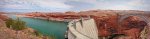
Here is a pano showing the details of the Powell Dam and the bridge over the Colorado River to the right. It really is huge!

http://cem.usakligil.com/img/f/o/e05848.jpg
Powell Dam (pano stitched from 3 hand-held pictures in PT Assember using a hybrid projection to articulate the depth of the river gorge)

Cheers,

Asher Kelman
January 21st, 2010, 02:02 PM
Can you stitch it to the first picture too?

What did you use for the hybrid. PTGui? I must try that!

Asher

Cem_Usakligil
January 21st, 2010, 02:09 PM
Can you stitch it to the first picture too?

What did you use for the hybrid. PTGui? I must try that!

Asher
Hi Asher,

The first picture is taken at a different location and has a totally different perspective. Besides having a different focal length. So I don't think that it would be possible to stitch it to this one. This one's horizontal FOV is already 105 degrees anyway. The program is the PT Assembler, similar to PT GUI. The hybrid projection I have used was: quadrant 1: recticilindrical, q2: recticilindrical, q3: cassini and q4: cassini.

Cheers,

Asher Kelman
January 21st, 2010, 02:28 PM
Cem,

I'm particularly interested in being able to segment the projection as you have done so well here. Of PTGui and PT assembler, which is likely easier to use, especially on a Mac running Parallels? Is the learning curve the same? I want to try something this weekend with whatever is the most straightforward and intuitive.

BTW, Are these quadrants from left to right or two rows of two?

Asher

Cem_Usakligil
January 21st, 2010, 02:29 PM
Are these quadrants from left to right or two rows of two?

Asher
Q1: top-right, Q2: top-left, Q3: bottom-left, Q4: bottom-right (2x2 thus).

Bart_van_der_Wolf
January 22nd, 2010, 06:49 AM
Cem,

I'm particularly interested in being able to segment the projection as you have done so well here. Of PTGui and PT assembler, which is likely easier to use, especially on a Mac running Parallels?

PTGui (http://www.ptgui.com/) comes in a Mac version, but PTAssembler (http://tawbaware.com/ptasmblr.htm) offers all the special projections and many other neat tricks to do the impossible, like creating a stitched image of a flat plane subject (e.g. wall painting, or store front, or large map scanned in several segments) even when shot from different locations/angles. It (the beta version (http://tawbaware.com/ptasmblr_51b6.zip) that is) also allows object removal in the overlap between tiles.

Is the learning curve the same? I want to try something this weekend with whatever is the most straightforward and intuitive.

They both have a learning curve, so it depends on your prior exposure to such programs. Both have automated stitching capabilities, but it is when the automation fails to produce a good result where these programs excel and a program like Autopano Pro/Giga will leave you wondering.

What Cem has used, a hybrid projection stitching is a photographers dream, because it allows to combine accurate architectural reproduction in one part of the stich with artistic view in another part when there are rules (and straight lines) that need to be bent to create a 'better' image. For that PTAssembler is what's needed (running under Parallels because it's a Windows application), and it's a lot cheaper as well.

Cheers,
Bart

Asher Kelman
January 22nd, 2010, 09:50 AM
..
They both have a learning curve, so it depends on your prior exposure to such programs. Both have automated stitching capabilities, but it is when the automation fails to produce a good result where these programs excel and a program like Autopano Pro/Giga will leave you wondering.

Thanks so much for answering such a lot of questions in one go! I already realized I needed hybrid segmentation of the panos for some presentations. I merely imagined what would be great. Cem's work confirms it's value in practice.

For that PTAssembler is what's needed (running under Parallels because it's a Windows application), and it's a lot cheaper as well.

We'll have a try! Right now I'me introducing myself to Capture linked to the Eos Utility for the next pano. With the hybrid stitchers, I'll be in pano-Nivana!

Asher

Mark Prins
January 22nd, 2010, 01:22 PM
PTGui has added a number of alternative and segmented projections. You can also enable the PanotoolsNG for some alternates though as of writing I have gone back to Joost's stitcher engine. Funny that, I have both PTassembler and PTGui on my box and I use both but I do lean to PTGui. Depends on the image.

Mark Prins
Inanda Images

Asher Kelman
January 27th, 2010, 11:40 AM
Mark, Cem, Bart, Valentin, Ben and others!

Back to the issue of completing a Pano with the advantages of segmenting the final presentation projections, can one pick up the saved file of Autopano Giga in Mac and transport it to PTgui in Mac or does one have to get a PTGui and boot that up under Parallels in PC emulation?

I'm very keen to look at creative options of segmenting my presentation of my latest rooftop panorama.

Asher

Bart_van_der_Wolf
January 27th, 2010, 12:10 PM
Mark, Cem, Bart, Valentin, Ben and others!

Back to the issue of completing a Pano with the advantages of segmenting the final presentation projections, can one pick up the saved file of Autopano Giga in Mac and transport it to PTgui in Mac or does one have to get a PTGui and boot that up under Parallels in PC emulation?

I'm not too familiar with PTGUI, but it also comes as a Mac version, so I don't think you need to use the Windows version under Parallels to get access to its segmented projection methods.

If you want to use the PTAssembler Hybrid projections, then this Windows only program will presumably run under Parallels.

The programs will be able to apply a projection to an already stitched image, but that woulld require multiple projection deformations (1 to warp and stitch, and one to re-apply a different projection). It's best to do the whole stitching operation and conversion to the final projection within the same application. I know that Autopano Giga can export a project file to PTAssembler, so you could have a flying start, but the incompatibilities between the programs is growing, so there might be hiccups.

I'm very keen to look at creative options of segmenting my presentation of my latest rooftop panorama.

So did that attempt turn out well, despite the difficulties of getting a stable platform on the roof to shoot from?

Cheers,
Bart

Michael Fontana
January 27th, 2010, 12:33 PM
The first picture is taken at a different location and has a totally different perspective.

Cem, can you show the two pictures, too?

Asher Kelman
January 27th, 2010, 01:03 PM
I
So did that attempt turn out well, despite the difficulties of getting a stable platform on the roof to shoot from?


Thanks Bart for asking. That's kind.

Yes I returned to the roof with a new tripod to be able to crank up higher after adjusting my system. The wind was high and cold and it was hard to see the screen even with the light I brought up. I used a little flashlight but once extended, it was difficult to manage as one had to work by touch and every so often, I'd have to restart.

Still I finished several sets of images and then spent ages attempting to stitch and failed many times until I simplified things and removed duplicates and excess overlaps that were not absolutely needed. Gradually I got control and mastered the links in both PTGui and my old friend Autopano Giga. Finally I found AP Giga more fluid.

I am in control of axis changes so I'm like a boy with a new train set, LOL! I'd love to have a game controller for this!!!!!

I complete in the early hours of this morning a good stitch and saved the files periodically. I read somewhere that one can go import to PTGui only in windows.

I will try that first.

Asher

Asher Kelman
January 27th, 2010, 02:19 PM
If one looks at Valentin Arfire's panorama, here (http://www.360cities.net/image/charles-bridge-prague?override_cache=true) of the Charles Bridge in Prague, not only do you get instant pleasure, but control of the projection through a simple interface. All that's missing is correction of verticals and hybrid projections. Can images be exported to such easily understood interfaces and then get a high resolution image one can use for one's work?

Asher

Cem_Usakligil
January 27th, 2010, 02:30 PM
Hi Michael,

The first picture is taken at a different location and has a totally different perspective.

Cem, can you show the two pictures, too?
I had at first shown this picture in another thread:

http://cem.usakligil.com/img/f/o/e05851.jpg


and then the pano one:
http://cem.usakligil.com/img/f/o/e05848.jpg


After that, Asher has asked:
Can you stitch it to the first picture too?

To which I have replied:
..The first picture is taken at a different location and has a totally different perspective. Besides having a different focal length. So I don't think that it would be possible to stitch it to this one. This one's horizontal FOV is already 105 degrees anyway. ...

I hope this clarifies what was meant by that remark :-).

Cheers,

Michael Fontana
January 27th, 2010, 04:01 PM
thanks Cem,

that' s clear now.
So the top is rectilinear - for the bridge - and the bottom is in cassini projection?
So how diagonal lines look like in the cassini projections?

Some projections - working fine for landscapes don't excels for architecture.

Bart_van_der_Wolf
January 28th, 2010, 11:53 AM
thanks Cem,

that' s clear now.
So the top is rectilinear - for the bridge - and the bottom is in cassini projection?
So how diagonal lines look like in the cassini projections?

Some projections - working fine for landscapes don't excels for architecture.

That's right. You don't want anything else than rectilinear if edges/lines in any direction must stay straight. With Cassini only horizontals stay straight and parallel, but they get shortened and get closer to each other towards the top/bottom of the image.

Cheers,
Bart

Sean DeMerchant
January 29th, 2010, 01:06 PM
Hi Michael,


I had at first shown this picture in another thread:

http://cem.usakligil.com/img/f/o/e05851.jpg


and then the pano one:
http://cem.usakligil.com/img/f/o/e05848.jpg


These two stitch together adequately by hand. A crop of some of the bottom and some blending of the water yield a very powerful image. I would call the result with the shift in perspective a photo-illustration as opposed to a photograph. It is a type of result with which I am very intrigued. I can post my sample if you are interested.

Remember, sometimes it is enough to fool the senses so we imagine it. It is relatively easy to use the distant mountains for alignment and manually stitch in difference mode along the darkest possible path. The clouds have a clear path. The fractured landscape is easily done. Leaving only the water where some curves work and blurring of a layer mask. Crop the bottom include the water blur join so we have only one dam in the photo and we get some strange but not incomprehensible mixture of perspectives going wider than a real lens can.

some thoughts,

Sean

Cem_Usakligil
January 29th, 2010, 01:30 PM
These two stitch together adequately by hand. A crop of some of the bottom and some blending of the water yield a very powerful image. I would call the result with the shift in perspective a photo-illustration as opposed to a photograph. It is a type of result with which I am very intrigued. I can post my sample if you are interested.

Remember, sometimes it is enough to fool the senses so we imagine it. It is relatively easy to use the distant mountains for alignment and manually stitch in difference mode along the darkest possible path. The clouds have a clear path. The fractured landscape is easily done. Leaving only the water where some curves work and blurring of a layer mask. Crop the bottom include the water blur join so we have only one dam in the photo and we get some strange but not incomprehensible mixture of perspectives going wider than a real lens can.

some thoughts,

Sean
Hi Sean,

This is very interesting to hear, thanks for trying it out. Yes please, do show us your sample :-)

Cheers,

Sean DeMerchant
January 29th, 2010, 01:41 PM
Hi Sean,

This is very interesting to hear, thanks for trying it out. Yes please, do show us your sample :-)

Cheers,

94
(http://www.openphotographyforums.com/forums/attachment.php?attachmentid=94&d=1264800786)
Hoover Dam, Copyright Cem Usakligil

The image feels close to real and higher resolution work would yield similar results at a cost in time.

enjoy,

Sean

Asher Kelman
January 29th, 2010, 08:57 PM
Sean,

I'm glad you did the stitch. I already planned to do it and I figured it would look this good. It's important to find walls to be knocked down.

Great result.

Cem,

I have a lot to learn from your hybrid projections but one thing is obvious right now; the brain seems to have no problem making sense. This is probably due to our natural selection to survive while smoking weed and getting high or nature! Man has been drunk or stoned for the past 500,000 years! So we can, indeed drive pretty drunk and bring home the booty!

Asher