View Full Version : Image Processing First Class! The 64 BIT advantage.
Asher Kelman
May 25th, 2007, 06:27 PM
Those who know about the effort astronomers go to extract sharp images of distant galaxies, stars and nebulae, realize that there's a lot of mathematics involved in undoing the blurring caused by the earths movement, refraction through the atmosphere, bright pixels and plain random noise that goes with imaging mostly black sky.
We pay more and more for ever increasing pixel count and perhaps dynamic range as well as more menus than in Martha Stewarts TV shows!
I was wondering how we could address a simple issue of blur and was impressed with using the wavelet algorithm in ImagesPlus. The relevant thread in Imaging Technology: Theory, Alternatives, Practice and Advances is here (http://www.openphotographyforums.com/forums/showthread.php?t=3009). We have e used it in a first look, to sharpen a flower photographed by James Newman with a Nikon 105mm Macro lens at 1/60 sec and f25!
I ask everyone who wants to get the best out of their RAW images especially to look at the possibilities of this software which is downloadable as a demo here (http://www.mlunsold.com/).
I hope we can use this as an initial approach to openly discussing new ways to optimize images without spending a fortune!
Asher
Bart_van_der_Wolf
May 27th, 2007, 11:42 AM
I hope we can use this as an initial approach to openly discussing new ways to optimize images without spending a fortune!
First of all, one should differentiate between sharpening and increasing edge-contrast/acutance. Sharpening contracts the blur in surrounding pixels back to the originating pixel, thus creating smaller/sharper features (like e.g. the Richardson-Lucy algorithm does). Acutance produces a locally steeper luminance gradient between contrasty edges/pixels (e.g. like Unsharp Masking does). Both can produce a visually sharper impression, but they potentially handle noise/grain
quite differently.
Second, sharpening of the original (Raw converted) capture can subsequently be followed by a dedicated output sharpening (at the final output dimension) and/or tonal processing that changes local contrast to a visually more pleasing (3D like) result. By the way, capture-sharpening before down-sampling and output-sharpening is generally not recommended, because it increases the chance of producing aliasing artifacts.
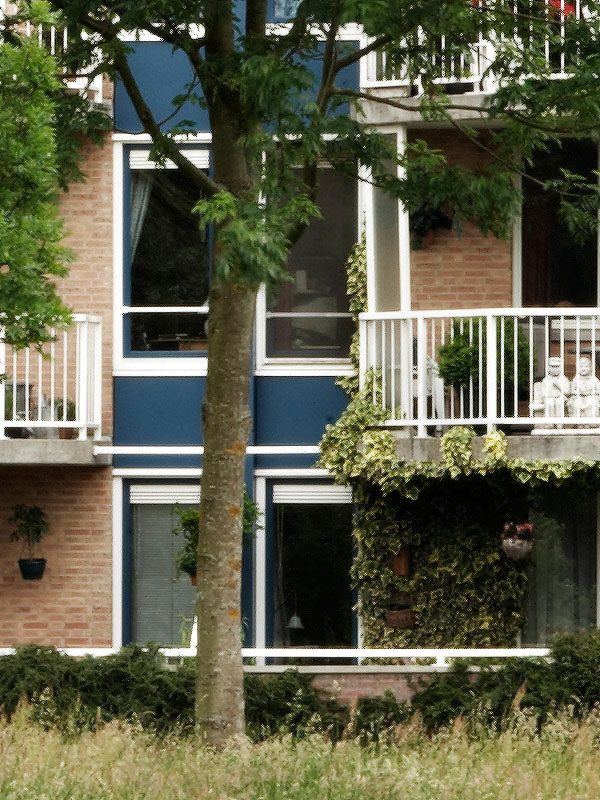
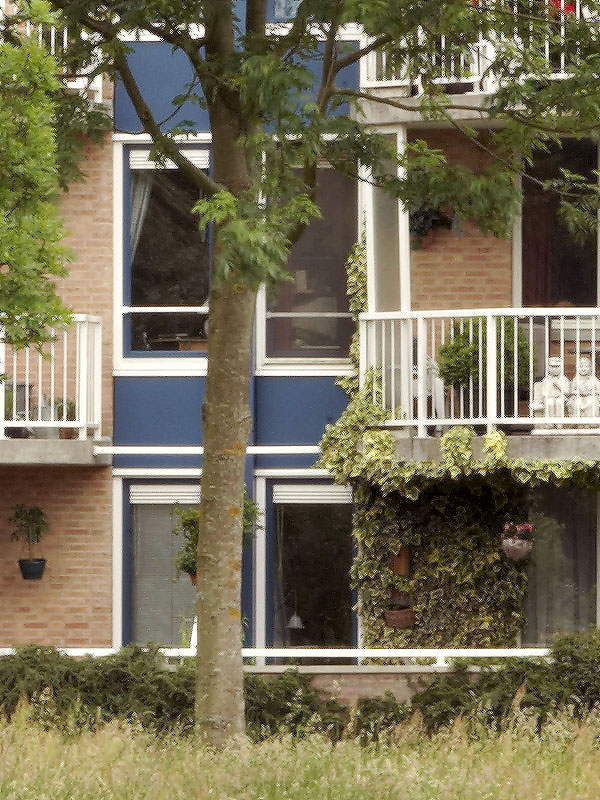
As an example of capture-sharpening by using ImagesPlus' Adaptive Richardson-Lucy restoration, I present 2 center crops from an EOS-1Ds Mark II capture with a TS-E 90mm f/2.8. One crop is from a shot taken with f/8.0, the other is from an identical shot taken with f/32 (to demonstrate the devastating effect of diffraction). Please focus on the building structures, because the leaves/grass were moving in the breeze (especially with the longer exposure time of the f/32 one). By the way, the optimal aperture differs from lens to lens, and it varies with AA-filter and sensel size (due to the angular sampling resolution of the diffraction pattern). The 2 original images are PNG files (hope they load well in the various browsers) to avoid lossy JPEG compression artifacts (the Richardson-Lucy algorithm 'restores' the artifacts only too well), the post-processed results are high quality JPEGs.
Apertures used: f/8.0 and f/32 respectively, Raw converter: C1 without sharpening
http://www.xs4all.nl/~bvdwolf/temp/OPF/OPF_Deblur_F080_Crop01.png http://www.xs4all.nl/~bvdwolf/temp/OPF/OPF_Deblur_F320_Crop01.png
The same (f/8.0 and f/32) images after adaptive RL restoration (with a custom Gaussian kernel):
http://www.xs4all.nl/~bvdwolf/temp/OPF/OPF_Deblur_F080_RLG050LRGB1.jpg http://www.xs4all.nl/~bvdwolf/temp/OPF/OPF_Deblur_F320_RLG060LRGB1.jpg
These images could in turn be processed with e.g. Nicolas Claris' sharpening action which helps to improve tonality, although the last (small radius) smart sharpening parts of the action could in this case be tuned down a bit (or turned off) because the f/8.0 image is already plenty sharp. The severly diffraction limited f/32 version can use all the help it can get with the action as is.
I look forward to seeing other restoration results. If someone prefers to have access to the original 16-bit/channel crops for their experiments, just let me know ...
Bart
Asher Kelman
May 27th, 2007, 12:00 PM
Thanks so much Bart for introducing me to ImagesPlus! Could you send the 16 BIT /channel crops by the free serivce http://www.openphotographyforums.com so we can have a try!
Asher
Asher Kelman
May 27th, 2007, 02:57 PM
Thanks Bart for the images!
Anyone who wants them let me know and I'll send them to you. You can then download a trial copy of ImagesPlus™ and follow up with whatever other processing such as sharpenin to otimize the image according to your workflow.
Just let us know the steps!
Asher
Steve Saunders
May 28th, 2007, 03:04 AM
Interesting stuff, thanks.
Chuck Fry
May 28th, 2007, 10:10 AM
Call me when it's available for Mac OS X.
Nicolas Claris
May 28th, 2007, 10:50 AM
Bounjour bart,
I gave a fast try... (the file is JPG as otherwise far too heavy for our friends with lowband connection!)
ƒ8 treated with 1 run of sharpening action - 70%-level midtone 1.1
flatten
ƒ8 treated with 2nd run of sharpening action - 70%-level midtone 1.1
flatten
ƒ 22 treated with 1 run of sharpening action - 70%-level midtone 1.1
flatten
USM 300/0,3/0
level midtone 1.1
But in my normal workflow, I always sharpen between 50 to 75 in CI before processing...
and sharpening is always better on the hires pic than on the web version...:
http://mnclaris.free.fr/forum/OPF_Deblur_F320_Crop01_NC.jpg
and repost of yours for easy comparison:
The same (f/8.0 and f/32) images after adaptive RL restoration (with a custom Gaussian kernel):
http://www.xs4all.nl/~bvdwolf/temp/OPF/OPF_Deblur_F080_RLG050LRGB1.jpg http://www.xs4all.nl/~bvdwolf/temp/OPF/OPF_Deblur_F320_RLG060LRGB1.jpg
Asher Kelman
May 28th, 2007, 11:45 AM
Hi Nicolas,
Your f8 image is wonderful, I cannot do any better as yet.
Did you include any work in ImagesPlus? I just used the f32 image Bart posted above and basic workflow: levels (tiny amounts at each end), an S curve, USM ~ 10,25,0 then 184,0.2,0 X3 and decreased saturation by 35% and converted to sRGB:
http://www.openphotographyforums.com/2007_OPF_AK/Bart_Van_Der_Wolf/OPF_Deblur_F320_RLG060LRGB1_AK.jpg
© 2007 Bart Van Der Wolf f32 image, Bart's adaptive RL restoration (with a custom Gaussian kernel) edited by asher Kelman
For reference: Bart's Original f32 image, Bart's adaptive RL restoration (with a custom Gaussian kernel):
http://www.xs4all.nl/~bvdwolf/temp/OPF/OPF_Deblur_F320_RLG060LRGB1.jpg
© 2007 Bart Van Der Wolf f32 image, Bart's adaptive RL restoration (with a custom Gaussian kernel)
and using Pictocolor's CS2 plugin, icorrectEditLab Pro 5.01, before the USM for the same f32 image:
http://www.openphotographyforums.com/2007_OPF_AK/Bart_Van_Der_Wolf/OPF_Deblur_F320_RLG060LRGB1_AK_Picto.jpg
© 2007 Bart Van Der Wolf f32 image, Bart's adaptive RL restoration (with a custom Gaussian kernel)edited by asher Kelman using EditLab and USM
So it appears that one can add benefit from following Bart's adaptive RL restoration (with a custom Gaussian kernel) with basic CS2 workflow to get an improved image. I would sharpen a little less the leaves, but the tree and bricks are fine.
So if your workflow followed Barts use of Imageplus, there would be an even better result, I bet. If this is so, we then have a way of using f32 for great depth of field and still getting a very usable image. Now have we undone to any extent the individual pixel damage caused by diffraction? I don't know!
Asher
I should haves, but didn't start with the 100% file Bart sent me, but this is Memorial Day today and I'm somewhat Americanized!
Nicolas Claris
May 28th, 2007, 12:30 PM
Hi Nicolas,
Your f8 image is wonderful, I cannot do any better as yet.
No Asher, I'm still on Mac...
the worflow was (as stated above):
ƒ8 treated with 1 run of sharpening action - 70%-level midtone 1.1
flatten
ƒ8 treated with 2nd run of sharpening action - 70%-level midtone 1.1
flatten
In your version of ƒ32, the plants on the brickwall (just under the terrace) are far too sharpened and pixellized. I stopped my sharpening in my version of ƒ32 just before this issue ;-)
Asher Kelman
May 28th, 2007, 12:52 PM
In your version of ƒ32, the plants on the brickwall (just under the terrace) are far too sharpened and pixellized. I stopped my sharpening in my version of ƒ32 just before this issue ;-)
Yes, I admit it!
So it appears that one can add benefit from following Bart's adaptive RL restoration (with a custom Gaussian kernel) with basic CS2 workflow to get an improved image. I would sharpen a little less the leaves, but the tree and bricks are fine.
But that's easy with selective sharpening to not do so much for the leaves, of course!
Still, when you are back in your office with the MacBookPro, and can use ImagesPlus™, then we can see whether or not your very exensive sharpening actions following ImagesPlus™ will really make the picture come to life even though it was shot at f32!
Even better, starting with the 100% cut outs that Bart sent, I think it might well exceed our expectations.
Do you have Parallels™ to run the ImagesPlus™ windows software?
Asher
Nicolas Claris
May 28th, 2007, 01:15 PM
Do you have Parallels™ to run the ImagesPlus™ windows software?
No another system/software, but I never use it and can't even remember it's name! LOL
I'll see if I have time tomorrow, can you PM the link to get the hires files?
Bart_van_der_Wolf
May 30th, 2007, 07:45 AM
I have re-processed the f/32 diffraction limited crop in ImagesPlus with a much more tuned model of the blur-kernel, but still without additional tone adjustments.
This is the f/32 diffraction limited result, after adaptive Richardson-Lucy restoration:
http://www.xs4all.nl/~bvdwolf/temp/OPF/OPF_Deblur_F320_RLCGm100L1.jpg
There are some visible artifacts, but the overall result has regained much of the original information.
One nice consequence of this restoration capability is that in 'pathological' cases, one can attempt to address anticipated aliasing artifacts by shooting a diffraction limited version of the subject, and restore some of the lost resolution/modulation by postprocessing. The aperture needed for such an approach depends on the sensel dimensions and the lens used, so it differs between camera/lens combinations.
Bart
Asher Kelman
May 30th, 2007, 12:29 PM
One nice consequence of this restoration capability is that in 'pathological' cases, one can attempt to address anticipated aliasing artifacts by shooting a diffraction limited version of the subject, and restore some of the lost resolution/modulation by postprocessing. The aperture needed for such an approach depends on the sensel dimensions and the lens used, so it differs between camera/lens combinations.
Hi Klaus,
This is fascinating! Could you think of an example of where you think this might be useful.
I can imagine one practical purpose, for example being able to use normally shunned tiny apertures for increased DOF. In this case, then would there be an advantage to getting exposures say f11, f16, f22, f32, so one could calclulate backwards zero diffraction for the f32 case?
Asher
Herman Teeuwen
June 1st, 2007, 02:06 PM
My try on the crop, just sharpening, using Noel Carboni's Fractal Sharpening:
http://www.xs4all.nl/~teeuwen/OPF_Deblur_F080_Crop01_TE.jpg
Herman
Asher Kelman
June 1st, 2007, 03:24 PM
Excellent!
Herman,
Is that the f32 image?
Can you also try with ImagesPlus as the first part of your workflow/
Thanks,
Asher
Herman Teeuwen
June 1st, 2007, 03:28 PM
Hi Asher,
The one on the left is f8, the other one f32.
Herman
Asher Kelman
June 1st, 2007, 04:05 PM
Did you use the Cr2 file are is this just was posted here?
Asher
Herman Teeuwen
June 1st, 2007, 04:06 PM
On the left f/32 posted earlier (fractal sharpening only), on the right f/32 fractal sharpening + additionally AKVIS Enhancer:
http://www.xs4all.nl/~teeuwen/OPF_Deblur_F080_Crop01_TE2.jpg
Herman Teeuwen
June 1st, 2007, 04:17 PM
> Did you use the Cr2 file are is this just was posted here?
I used the PNG's posted by Bart on page 1.
Herman
Asher Kelman
June 1st, 2007, 05:10 PM
Actually, Herman, the files are not CR2 but are expressly prepared large files for this excercise. i've sent them to you!
Asher
Nicolas Claris
June 2nd, 2007, 05:55 AM
Here's my new take with the tif (cropped) files received.
This has been done with my own worflow, to much time needed (and boring!) to go thru windows installing software etc.As i don't intend to change of OS I see no reason to change my workflow, but I see many reasons to be curious to see what others can do with other workflow.
BTW, on the ƒ32 one can see now a little spot (pointed with the red arrow) that was certainly on the sensor… Another reason Paul (Bestwick) to have a really cleaned sensor ;...)
http://mnclaris.free.fr/forum/OPF_Deblur_F080_Crop_NC.jpg
of course there are also some color tuning as the original were too greenish for me.
Bart_van_der_Wolf
June 2nd, 2007, 06:03 AM
My try on the crop, just sharpening, using Noel Carboni's Fractal Sharpening:
Hi Herman, thanks for the addition to our palette of options. It would be nice if someone could add a FocusMagic (http://www.focusmagic.com/) version as well.
Downsampling after (fractal) sharpening can unfortunately lead to aliasing artifacts, and as your examples show there is also some overshoot/halo near contrasty edges. But it is an interesting option.
Bart
Bart_van_der_Wolf
June 2nd, 2007, 06:08 AM
BTW, on the ƒ32 one can see now a little spot (pointed with the red arrow) that was certainly on the sensor… Another reason Paul (Bestwick) to have a really cleaned sensor ;...)
That's what f/32 will do for you. The sensor will never be clean enough http://www.openphotographyforums.com/forums/images/icons/icon9.gif .
Bart
Bart_van_der_Wolf
June 12th, 2007, 02:59 PM
It would be very useful for comparison to have examples of the crops presented earlier in this thread, processed with those applications. Anyone?
Bart
Asher Kelman
June 24th, 2007, 09:38 AM
It would be very useful for comparison to have examples of the crops presented earlier in this thread, processed with those applications. Anyone?
Bart
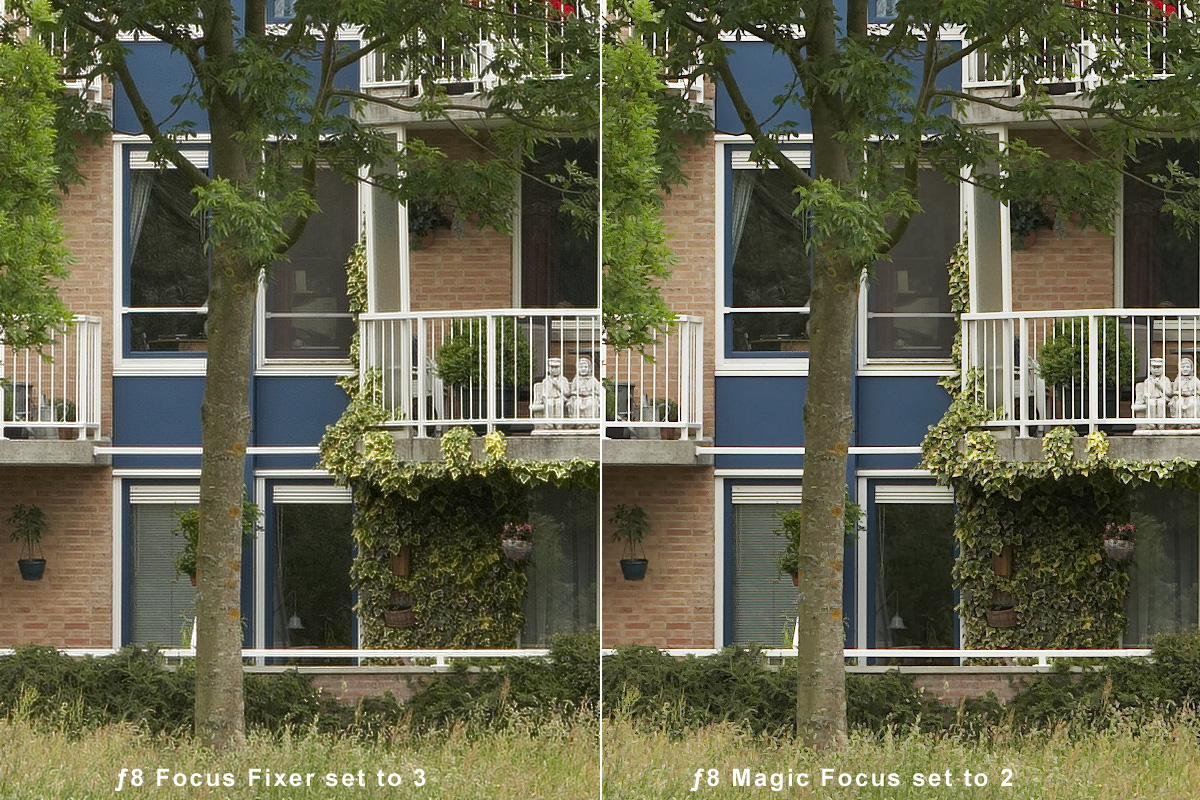
Can we look at this again and see what 'FocusMagic' or 'FocusFixer' might do for an f32 diffraction limited image?
Asher
Nicolas Claris
June 24th, 2007, 10:26 AM
What Asher asks is what Asher gets...
http://mnclaris.free.fr/forum/OPF_Deblur_F320_Crop01_Focu.jpg
http://mnclaris.free.fr/forum/OPF_Deblur_F080_Crop01_Focu.jpg
Asher Kelman
June 24th, 2007, 11:36 AM
What Asher asks is what Asher gets...
http://mnclaris.free.fr/forum/OPF_Deblur_F320_Crop01_Focu.jpg
http://mnclaris.free.fr/forum/OPF_Deblur_F080_Crop01_Focu.jpg
(At first this did not load! I'm wondering whether the vBulletin software favors jpg over png in speed of loading?).
I seems that focus fixer has the superior algorithm. Do you agree Nicolas. How is in 100% pixels cut out of the grass?
Asher
Nicolas Claris
June 24th, 2007, 11:52 AM
Well I did load png as it was the original type of file...
JPG set @ 80/100 is 548 Kb, same but PNG is 2.1 Mb... this explains that…
Then to compare, I'll do tomorrow on my main computer as it is very difficult to do comment precisely when viewed with the powerbook screen…
Which files are you talking about ƒ32 or ƒ8?
Asher Kelman
June 24th, 2007, 12:02 PM
Nicolas,
I thought they were all f32, LOL! It now seems if your previous sharpenings were better. Did you run your sharpening plus Akvis on this Focus and Magic Focus?
IOW, are we seeing the best you can put together?
Asher
Nicolas Claris
June 24th, 2007, 12:06 PM
Asher
I just realized that I used the PNG's posted by Bart on page 1!
Will repost with tif that I still have...
Nicolas Claris
June 24th, 2007, 12:27 PM
So here are the newly processed images from 16 bit tifs.
Shot @ ƒ8:
http://mnclaris.free.fr/forum/OPF_Deblur_F080_Crop01_NC_FF.jpg
Shot @ ƒ8:
http://mnclaris.free.fr/forum/OPF_Deblur_F320_Crop01_NC_FM.jpg
Nicolas Claris
June 24th, 2007, 01:00 PM
For easy comparison, below are the most interesting ones (IMO)
http://mnclaris.free.fr/forum/OPF_Deblur_original.jpg
http://mnclaris.free.fr/forum/OPF_Deblur_LR2.jpg
http://mnclaris.free.fr/forum/OPF_Deblur_Carboni.jpg
http://mnclaris.free.fr/forum/OPF_Deblur_NC.jpg
(without any color corrections as I did previously)
Asher Kelman
June 24th, 2007, 01:30 PM
Nicolas,
1.What do you think so far, since you can look at things 100% or are these 100%?
2. Have you run sharpening on your Focus Magic and Focus Fixer examples? IOW, is there benefit from adding these programs before using your best sharpening method?
Asher
Nicolas Claris
June 24th, 2007, 03:04 PM
Well
their are all 100% of the cropped file I got.
My preference (seen on a powerbook) is in order:
Focus fixer
Noel Carboni
My action
I recognize, that on this sample my action is beatten! but they're all not free ;-)
Now, I'd like to read other's opinions
Bart_van_der_Wolf
June 24th, 2007, 03:44 PM
For easy comparison, below are the most interesting ones (IMO)
Nicolas, in post #12 I presented an improved version of the f/32 version processed with the adaptive RL algorithm. Could you exchange the current/old version in your post with hat one?
I have also done some tests with SizeFixer from FixerLabs. It incorporates their 'Lensfix' functionality with (potential) interpolation functionality. It looks nice (I'll post examples when I'm back at my main PC), in fact very close to my 'best' ImagesPlus results when SizeFixer is used without interpolation (100% scale). I have yet to test its interpolated result when downsampled.
Bart
Asher Kelman
June 24th, 2007, 03:48 PM
Well
their are all 100% of the cropped file I got.
My preference (seen on a powerbook) is in order:
Focus fixer
Noel Carboni
My action
I recognize, that on this sample my action is beatten! but they're all not free ;-)
Now, I'd like to read other's opinions
Yes, Nicolas, but how do they look when your sharpening is added to the other Focus Fixer or Magic Focus? I seem to not be explaining myself.
It's like this:
1. Your sharpening is free and impressive. I like what you do.
2. Focus Magic seems great too. Now would it be even better followed by your action?
Thanks,
Asher
Nicolas Claris
June 25th, 2007, 12:08 AM
Nicolas, in post #12 I presented an improved version of the f/32 version processed with the adaptive RL algorithm. Could you exchange the current/old version in your post with hat one?
I have also done some tests with SizeFixer from FixerLabs. It incorporates their 'Lensfix' functionality with (potential) interpolation functionality. It looks nice (I'll post examples when I'm back at my main PC), in fact very close to my 'best' ImagesPlus results when SizeFixer is used without interpolation (100% scale). I have yet to test its interpolated result when downsampled.
Bart
Hi Bart
Sorry! I'll do that later today (got to go to work for now!)
Asher
please read : http://www.openphotographyforums.com/forums/showpost.php?p=28797&postcount=20
Herman Teeuwen
June 25th, 2007, 08:50 AM
A note for users of Noel Carboni's 'dSLR Fractal Sharpen' action (requires Genuine Fractals):
I just got a mail back from Noel. He has updated his actions for use with Genuine Fractals version 5. He'll be sending an update to registered users very soon. There is a also a pre-release.
Herman