PDA

View Full Version : CS3 composite


ron_hiner
June 15th, 2007, 08:08 PM
It seems like years ago, but in early April I saw a demo of a new CS3 feature that would make it a trival process to composite multiple images together. Unfortunatly, I don't remember the steps involved.

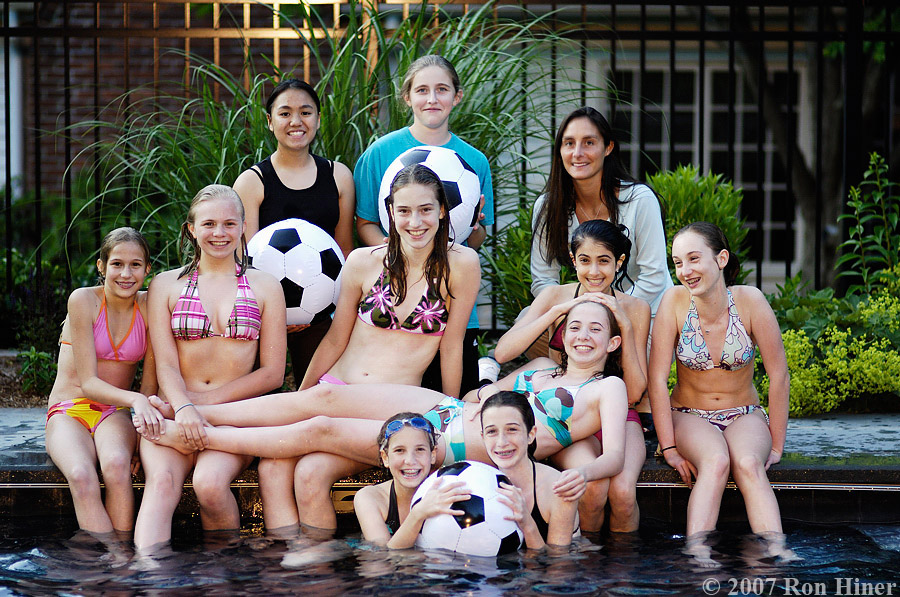
I have two shots of a group of 12 people. One shot has 10 good faces, and two bad ones. Those same two people look great in the other picture. So I want to copy the two good faces from one picture to the other picture. The two pix are almost identical in exposure and composition.

Anyone want to give me a hint to get started on this?

Thanks!

Ron

Asher Kelman
June 15th, 2007, 11:43 PM
Post the images and we'll work it out together.

How fast do you need this? Is it for client delivery or can we do it at ease?

Asher

John_Nevill
June 16th, 2007, 12:51 AM
Ron,

Just paste one group image as a layer onto the other, select both layers and hit align photo. CS3 will then rotate and and overlay one on the other, all you need to do is add a mask and paint in the blink free parts using a soft brush.

Asher Kelman
June 16th, 2007, 05:39 AM
Lets demonstrate this. Also one needs to deal with any changes in position or lighting etc.

Asher

ron_hiner
June 16th, 2007, 06:44 AM
Here we go...
team_1.jpg
http://www.ronhiner.com/opf/team_1.jpg
team_2.jpg
http://www.ronhiner.com/opf/team_2.jpg
team_3.jpg
http://www.ronhiner.com/opf/team_3.jpg
I guess the challenge is to pick the best picture, then pick better faces from the other two shots.

I get called upon to do these group shots all the time... and its very rare that I get a shot with all great facial expressions. In this series I love the big laughter from the girl on the left in team_2, but there isn't much else to like about that shot.

thanks all!

Ron

P.S. This is for fun... no paying clients involved. Good thing too... I'm kicking myself for thinking I'd get a good sharp group shot with a 1.4 lens opening.

Bart_van_der_Wolf
June 16th, 2007, 07:14 AM
I get called upon to do these group shots all the time... and its very rare that I get a shot with all great facial expressions.

It's a common issue with group shots, even to the extent of Microsoft Research having a special project called "Group Shot (http://research.microsoft.com/projects/GroupShot/)" looking into possibilities to address the issue.

Bart

Asher Kelman
June 16th, 2007, 08:19 AM
Ron,

I Liked Team 1 so I placed it over Team 3.

Method

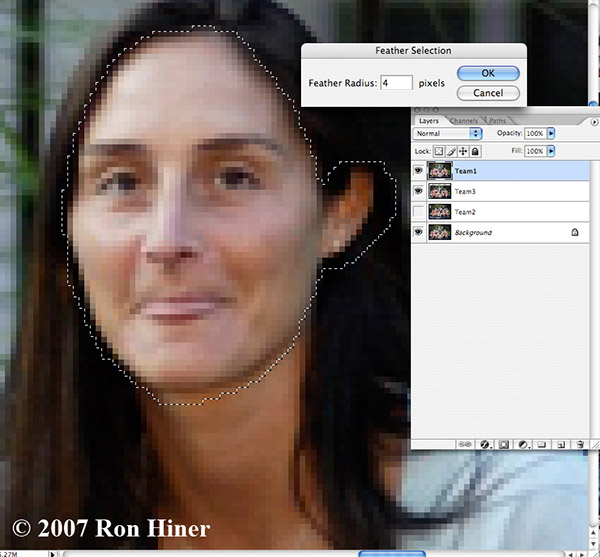
Change opacity of layer 1 to 50% to make it semi-transparent. Align head of girl on upper right at lower border of chin


Select the head at the hair and below the chin and feather 4 pixels


http://www.openphotographyforums.com/2007_OPF_AK/Ron_Hiner/Ron_Hiner_Orig_Selection.jpg


Then cut the selected area out to reveal the happy face below! Then flatten, add slight S-curve, sharpen a tad and voila


http://www.openphotographyforums.com/2007_OPF_AK/Ron_Hiner/Team1headfrom2.jpg

Asher

ron_hiner
June 16th, 2007, 09:27 AM
Nice Asher! I tried John's approach... I copied each image to one file as different layers. Then I auto-aligned the layers. Then put the one that needed the least work at the bottom. Then I added layer masks to the other two and just painted through with white and black. Using the rubylith key (backslash) helped a lot to see where I was going.
I found that I needed to move the masked layers around a bit to get patterns right on the swimsuits.
Here's my results.
http://www.ronhiner.com/opf/team_composite.jpg


I've done this with my 900px wide jpg files. I think I know enough about it now to try with the big files.

Asher Kelman
June 16th, 2007, 09:46 AM
Clayton,

Try my method too as it is probably simpler and faster with less fiddling. The idea is to do the least to deliver a good image. If it comes to matching swim suits, I'd step back a bit. Of course, it all depends on how much time one has. In general, I'd make sure I got the picture right in the first place and try to find an image with the least correction needed. This is one of the benefits of having a photo technician putting the images up on a screeen sp you can check that all the eyes are open, no one is holding a tissue etc.

Doing this work on someone else's pictures or assembling a collage is another matter! :)

My $0.02 :)

Asher

ron_hiner
June 16th, 2007, 09:53 AM
Asher -- can you post a screen shot of what your S-curve looks like? The difference in color is dramatic!

Ron

Asher Kelman
June 16th, 2007, 10:08 AM
Hi Ron,

I flattened the file already! Let me leave that for someone else for now, I'm sleepy, LOL!

Asher