PDA

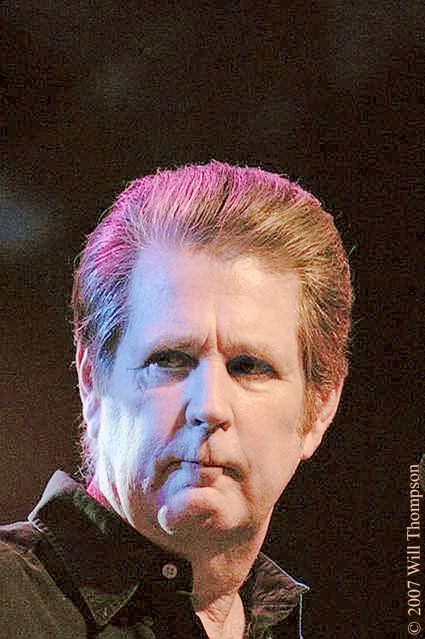
View Full Version : Challenge: Can you make My Brian Wilson photo not look blue/violet?


Will Thompson
June 16th, 2007, 10:12 PM
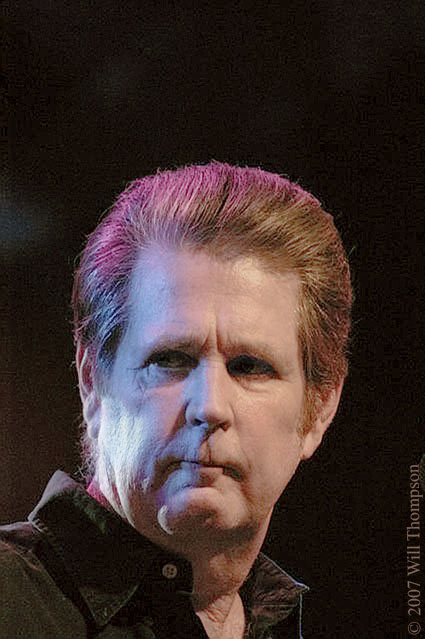
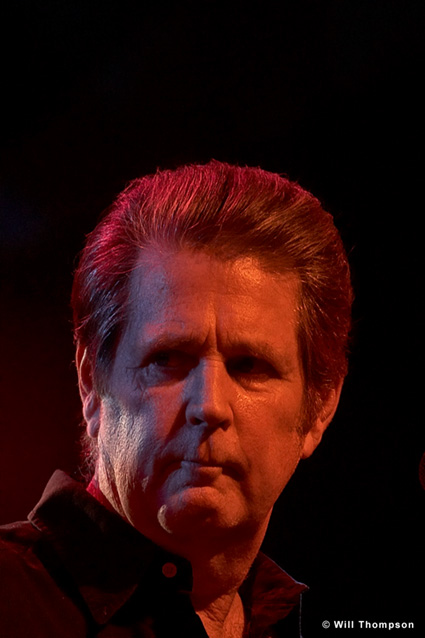
Can you make My Brian Wilson photo not look blue/violet?

So far the fastest fix I have found for this kind of multi color stage lighting is to convert to B&W.

I am hoping some of our OPF retouching geniuses have or can come up with a semi quick fix for this some what common problem.

Thanks in advance to all who tackle this problem.

http://idisk.mac.com/med007/Public/Wills/Celebrity/CRW_7983.jpg

Asher Kelman
June 17th, 2007, 12:07 AM
Well, this is a ghastly colored picture and seems as if it has laready been mesed with, especially the eyes!

Anyway, I had a quick try!

http://www.openphotographyforums.com/2007_OPF_AK/Will_Thompson/CRW_7983AK.jpg

Since you're my LF buddy, that's for you!

Asher

Kathy Rappaport
June 17th, 2007, 12:29 AM
My approach was to pull out the blues using curves but I didn't do any better than Asher did. Then I worked a small amount of healing brush and cloned the right side and with some patience it was working but I did not have time to finish since I am supposed to be packing for vacation. The important thing is packed - the camera bag is ready!

Nicolas Claris
June 17th, 2007, 01:51 AM
Is this the kind of result you're looking for?

http://mnclaris.free.fr/forum/CRW_7983_NC.jpg

Klaus Esser
June 17th, 2007, 02:10 AM
i guess, it looks bettr in b&w:


http://www.klausesser.de/CRW_7983_corr.JPG

Edward Bussa
June 17th, 2007, 06:22 AM
that's impressive - share your secret?!

perhaps its as simple as desaturate and tint - is that correct?

Ray West
June 17th, 2007, 07:59 AM
Hi,

I thought I'd play. Make a couple of layers. Desaturate one to give a B&W layer copy. The other layer, do a colour replacement of the blue shades with a skin tone from his lhs cheek - may as well do the whole face and hair, since not much blue in folk's skin. Then, with the b&W layer on top, adjust the opacity of the b&W layer until you get the detail back in the shadows, the way you want. I prefer the original, 'tho.

Best wishes,

Ray

http://www.yertiz.com/images/cw.jpg

Nicolas Claris
June 17th, 2007, 08:05 AM
that's impressive - share your secret?!

perhaps its as simple as desaturate and tint - is that correct?

Which one is impressive?

Klaus Esser
June 17th, 2007, 08:06 AM
Hi,

I thought I'd play. Make a couple of layers. Desaturate one to give a B&W layer copy. The other layer, do a colour replacement of the blue shades with a skin tone from his lhs cheek - may as do the whole face and hair, since not much blue in folk's skin. Then, with the b&W layer on top, adjust the opacity of the b&W layer until you get the detail back in the shadows, the way you want. I prefer the original, 'tho.

Best wishes,

Ray


Well - why not b&w? It´s monochrome anyway . . . :-) - besides of the little blue spots . .
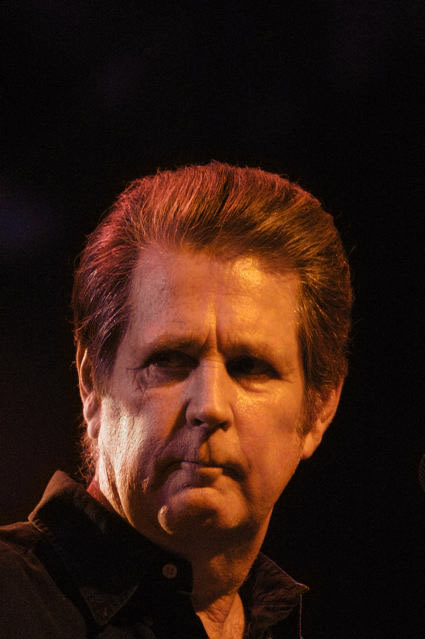
best, Klaus

Ray West
June 17th, 2007, 08:45 AM
Hi Klaus,

B&W is Ok, but I thought Will was after some colour, but not the blue/violet. The problem, I guess is with the coloured stage spotlights. Somehow, you need to change the colour of the lights, which are probably getting near monochrome. It would take a lot of detailed brushing/selecting, and Will was looking for a quick fix. The image does not interest me to try much else. i.e. I don't know who the subject is, and it's a jpeg, etc., and after a lot of effort wrt the colour (not talking about sharpening, or shadow/highlight detail here, it would still need improvement, and then, after maybe an hour or two's work, imho, the original would still be better. ;-)

Best wishes,

Ray

Nicolas Claris
June 17th, 2007, 08:53 AM
Which one is impressive?

Have retried with a much simpler workflow:

Go to selection menu/color range
pick the blue, then add/pick the violet and the white of the chick
set the range about 125. Click OK

Extend your selection by 10 pixels

Feather selection by 5 pixels

With color picker, grab the good color of the right part of face (kind of orange)

Apply this color (solid color down your layer palette) to the selection into your new layer (set the layer to be color.

Modify transparency of layer up to taste Set layer to around 70% transparency

Flatten image

Set hue to +5 to get reds a bit less red and a bit more yellow, looks more "natural" to me.

http://mnclaris.free.fr/forum/CRW_7983_NC2.jpg

Klaus Esser
June 17th, 2007, 08:58 AM
Hi Klaus,

B&W is Ok, but I thought Will was after some colour, but not the blue/violet. The problem, I guess is with the coloured stage spotlights. Somehow, you need to change the colour of the lights, which are probably getting near monochrome. It would take a lot of detailed brushing/selecting, and Will was looking for a quick fix. The image does not interest me to try much else. i.e. I don't know who the subject is, and it's a jpeg, etc., and after a lot of effort wrt the colour (not talking about sharpening, or shadow/highlight detail here, it would still need improvement, and then, after maybe an hour or two's work, imho, the original would still be better. ;-)

Best wishes,

Ray

Hi Ray!

The light is so bad on this image - there´s nothing seriously to be done. All must be a compromise.
The shadows are much too hard and too deep and the colour of the highlights . . well . . ;-)
The "classical" problem with stage photography without a fill-in light.

maybe a careful hand-colouring is a way to do it . .

best, Klaus

ok - another try :-) :
http://www.klausesser.de/CRW_7983-1.JPG

Kathy Rappaport
June 17th, 2007, 11:22 AM
Brian Wilson is one of The Beach Boys.....from 1960's music....

Klaus Esser
June 17th, 2007, 11:37 AM
Brian Wilson is one of The Beach Boys.....from 1960's music....

well . . . and that´s telling us what? :-) (i saw them arround ´65 or ´69 in LA - have no correct remembering. I studied sound-engeneering at that time)

best, Klaus

Cem_Usakligil
June 17th, 2007, 12:11 PM
This is what I've achieved by playing aroung with HSL levels in LR, no masking or layering at all.

http://www.envisagement.com/opf/shadow_copy/img_28276_0_163815183-O.jpg

I know that there is still some purple shade on the left hand side, but this I did intentionally.

Cheers,

Tim Armes
June 17th, 2007, 12:31 PM
Hi Will,

What a challenge! Personally, I really like the mixed lighting - but to each his own.

I think that the easiest way to treat this photo is to turn is to black and white and then recolour it by hand. I wonder if anyone has the time/skill to give this a go?

Tim

Asher Kelman
June 17th, 2007, 01:02 PM
Hi Will,

What a challenge! Personally, I really like the mixed lighting - but to each his own.

I think that the easiest way to treat this photo is to turn is to black and white and then recolour it by hand. I wonder if anyone has the time/skill to give this a go?

Tim

Hi Tim,

Mine was hand colored for the lips and cheeks on top of a corrected colored layer with cast removed.

http://www.openphotographyforums.com/2007_OPF_AK/Will_Thompson/CRW_7983AK.jpg

Here's adding back a B&W layer and multiply at about 40%.

Asher


http://www.openphotographyforums.com/2007_OPF_AK/Will_Thompson/CRW_7983AK2.jpg

Will Thompson
June 17th, 2007, 01:40 PM
WOW! Such amazing results.

For those that would like here are links to the RAW and .THM D30 files.

CRW_7983.CRW (http://www.yousendit.com/download/WFJXcXl1UzdvQUkwTVE9PQ)

CRW_7983.THM (http://www.yousendit.com/download/WFJXcXl0NmM3bUEwTVE9PQ)

The links will be good for only 7 days.

Have Fun All!

Nicolas Claris
June 17th, 2007, 02:18 PM
Here's my new take made from your raw file.

Used C1 with:
- D30 sunset ICC profile
- extra shadow film curve
- minus 20 saturation
- 0.9 midtone level

Then in PS
my sharpening action, flatten, export for the web

A huge difference with your original image posted...

http://mnclaris.free.fr/forum/CRW_7983_NC3.jpg

Thanks for sharing!

leonardobarreto.com
June 17th, 2007, 04:41 PM
http://leonardobarreto.com/images/TEMP/CRW_7983.jpg

talk to you will, leonardo

Scott Duffy
June 20th, 2007, 05:32 AM
http://www.alla-prima.co.uk/SD.jpg

Chip Springer
July 20th, 2007, 03:04 PM
Can you make My Brian Wilson photo not look blue/violet?

http://idisk.mac.com/med007/Public/Wills/Celebrity/CRW_7983.jpg

Used my Paint With Light (in color), Digital Grey Card actions (www.atncentral.com) and coloring action mentioned on previous post. Also used my
Digital Studio Lighting technique.

http://forums.dpreview.com/forums/read.asp?forum=1006&message=20540243&q=digital+grey+card+action&qf=m

http://forums.dpreview.com/forums/read.asp?forum=1006&message=23345725

http://img.photobucket.com/albums/v203/mcennis3/CSpringerWillson.jpg

Giovanni Brembati
September 9th, 2007, 05:05 AM
http://img248.imageshack.us/img248/5405/crw79832jf6.jpg (http://imageshack.us)


Working on White balance, selective color and saturation in PhotoResampling (http://www.photoresampling.com).


Jacopo

Will Thompson
September 9th, 2007, 09:16 AM
Greetings Giovanni,

On my Apple LCD monitor I like yours very much.

Can you do a detailed account of how you adjusted it.


Thanks,

Nicolas Claris
September 9th, 2007, 09:27 AM
Hi all
unfortunately for Mac OS users, photoresampling is Windows only…

Will Thompson
September 9th, 2007, 10:02 AM
There is always "virtual PC".

Nicolas Claris
September 9th, 2007, 10:49 AM
Yes Will, of course you are right!

There's also Parallels Desktop and some more.

I have a Macpro among 7 other Macs and 2 PCs… all networked of course.
That is to say that I won't start again the Mac/PC fight ;-)

I ran once, for the fun, Windows XP on the Macpro, but I use a Mac.
I cannot imagine switching from an OS to the other in the middle of a workflow.

BTW, I don't feel the need of photoresampling, which doesn't mean that it is not a nice piece of software.…

Have a nice (end of) Sunday


PS
and even:
codeweavers (http://www.codeweavers.com/products/cxmac/) for Mac Intel only
which is cheap and doesn't required a Windows Licence…

Giovanni Brembati
September 9th, 2007, 12:20 PM
Greetings Giovanni,

On my Apple LCD monitor I like yours very much.

Can you do a detailed account of how you adjusted it.


Thanks,

Hi Will,
I didn't remember exactly all steps and settings, so i tried to reproduce the final image once again. The new version developed is very close to the first one. These are the step used:

PhotoResampling software

1. Saturation -20
2. White Balance: From Temperature 5500 °K To Temperature 3000 °K. Chromaticity From -20 To +20
3. Saturation -15
4. Exposure +0.25
5. Adjust color: Red -10

After these steps photo become much better.
For a better result on the hair, i opened the photo in PhotoShop to remove a little red area still present using replace color.

That's it. By the way i think that the result could be improved working on it more.

Jacopo