PDA

View Full Version : Critique Desired: Taz


Bob Sumitro
March 20th, 2009, 10:15 PM
http://farm4.static.flickr.com/3449/3371348475_cd5444bbc8.jpg?v=0

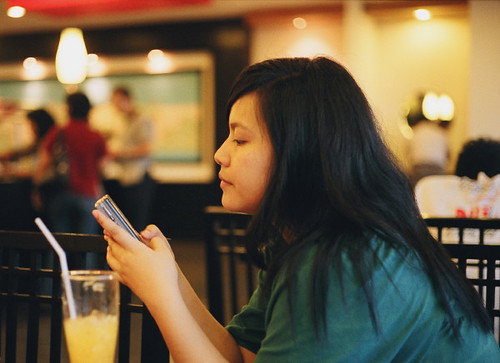
A candid picture of my daughter. I took this with M6, 50 cron wide open and fuji superia 400, lighting was indoor lighting of a restaurant.... hm, I guess it doesn't fall into the category of natural light?

I have a question re color correction. When I shoot dslr I shoot raw and most of the time I adjust the white balance using a WhiBal card, espescially indoor under tungsten light. My question is, in your opinion, under a tungsten light for instance, which one would you find better: a picture which white balance is corrected, or a pciture that is left as is... I mean with all that reddish or yellowish skin color due to the incorrect WB?

And of course, I'm looking forward to your critiques and comments.

Thanks for looking,
bob

Alain Briot
March 21st, 2009, 01:44 AM
I think the color balance is slightly off. Here's a possible adjutment:

http://beautiful-landscape.com/OPP/3371348475_cd5444bbc8-AB.jpg

Rod Witten
March 21st, 2009, 05:08 AM
http://farm4.static.flickr.com/3449/3371348475_cd5444bbc8.jpg?v=0

A candid picture of my daughter. I took this with M6, 50 cron wide open and fuji superia 400, lighting was indoor lighting of a restaurant.... hm, I guess it doesn't fall into the category of natural light?

I have a question re color correction. When I shoot dslr I shoot raw and most of the time I adjust the white balance using a WhiBal card, espescially indoor under tungsten light. My question is, in your opinion, under a tungsten light for instance, which one would you find better: a picture which white balance is corrected, or a pciture that is left as is... I mean with all that reddish or yellowish skin color due to the incorrect WB?

And of course, I'm looking forward to your critiques and comments.

Thanks for looking,
bob

Bob,

Found light works also. However, as you and Alain have addressed, white balance must be spot on when shooting in color. Can you convert it to black & white?

Rod

Doug Kerr
March 21st, 2009, 06:46 AM
Hi, Bob,

My question is, in your opinion, under a tungsten light for instance, which one would you find better: a picture which white balance is corrected, or a pciture that is left as is... I mean with all that reddish or yellowish skin color due to the incorrect WB?
Asher wrote a nice essay about that conundrum some while ago, in the throes of a big discussion about white balance color correction tools and techniques.

As I recall, he particularly cited the situation of scenes taken by the reddish light of sunset, where in fact a skin rendition that was "reddish" would be needed to convey to teh ultimate viewer of the image the overall ambiance. Another example is a picture of people taken by the light of a bonfire (I don't recall whether Asher invoked that example or not, but it is in the same category).

The paradox here is that human vision, up to a degree, applies almost the exact equivalence of what we thing of as white balance color correction (chromatic adaptation) - so that we perceive a sheet of white paper as "white", whether we observe it under incandescent light or daylight.

Yet, observed under a red floodlight (to give an artificial example), we may well perceive the paper as "looking reddish".

So our human system apparently draws the line in fully applying chromatic adaptation when it judges the incident chromaticity as "far from white". (And our raw developing programs do the same thing - try putting the eyedropper on that piece of paper shot under red illumination - the program won't make it "gray" .)

So in photography we perhaps need to be guided by that same notion. Thus, in a scene lighted by the deep glow of sunset, or by the light of a bonfire, we may wish to eschew "theoretically ideal" white balance color correction.

But in the mixed illumination of a restaurant, "theoretically ideal" white balance color correction - such as we are able to readily attain if we have a neutral target in the shot - is probably a pretty good bet.

In any case, it is a beautiful shot of a beautiful girl. Thanks for sharing with us.

Bob Sumitro
March 21st, 2009, 09:28 PM
Thank you very much Alain, Rod and Doug.

So far, after almost three years shooting digital, I only use canon DPP for post processing and then I only adjust the white balance, brightness and crop the image if necessary. I haven't tried to do more processing with, say, Photoshop or CS, cause I find the process is quite difficult for me. My daughter on the other hand, she seldom uses DPP, most of the time she uses CS2 ... and watching her working it looks easy, but when I tried it myself ... well it's not easy at all :-)

I think it's time for me to learn about post processing seriously.
Thanks, bob

Mike Shimwell
March 22nd, 2009, 01:28 PM
Bob

For the specific picture I would echo Doug's words and Alain's practice and suggest that something between a 'complete' colour balance correction and leaving as is will most likely achieve the result you are seeking. Although converting to monochrome removes the issue I don't see it as an answer to the problem as the choice of colour or black and white is an artistic choice rather than an answer to difficult light/circumstances.

M6, cron:) enjoy

Mike

Asher Kelman
March 22nd, 2009, 01:53 PM
http://farm4.static.flickr.com/3449/3371348475_cd5444bbc8.jpg?v=0

Original

http://beautiful-landscape.com/OPP/3371348475_cd5444bbc8-AB.jpg

ALain's Correction

Alain,

You have improved the situation, but a flaw remains which is, perhaps, more challenging. This problem rears up in mixed lighting. I call your attention to the shadow area just in front of her her on the left side of her face. Not only is it dark, but it seems to also have a slightly different hue. This shadow area obviously could not did not receive the same exposure to that incandescent light. So this looks like there was a mismatch in the sequential runs of a 4 color press print with CMYK inks. It looks like the layers were misaligned.

However, this is not the whole story. Taking some CMYK measurements from behind the lateral edge of the eye going horizontally towards the edge of the hair, we observe a jump in the proportion of the color that comes from cyan.
READINGS 1 . 2 . 3 . HAIR
C..............15 12 24 65
M.............54 52 75 52
Y.............83 77 96 49
K...............5 03 20 77


So what appears to be happening is that we have the wisps of hair in this area blurred by movement or imperfect focus, or else Bayer interpolation. The end result is that the rich Cyan of the hair is bleeding into the skin of the face.

If I'm correct in my assumptions, removing the colored shadow artifact requires, correct focus, one even source of light and fast shutter speed. This is the benefit of strobe duration of 1/1000 sec or less to freeze motion and overwhelm other lighting.

Still, one may not want this in sharp focus, one cannot alter the lighting and flash is not allowed. This picture is what is taken, what then? So we must accept it or else return to retouch in Photoshop or other software. The question now is how would you tackle this?

Asher

Nicolas Claris
March 22nd, 2009, 03:06 PM
Hi Asher
I have no clue on how you can make all these analysis on a so reduced image!

Isn't the issue you see (can't see the one you state on my MacBook Pro monitor…) coming from the scan of the fuji superia 400 film? This is not a dslr pic but film…

Asher Kelman
March 22nd, 2009, 03:35 PM
Hi Asher
I have no clue on how you can make all these analysis on a so reduced image!

Isn't the issue you see (can't see the one you state on my MacBook Pro monitor…) coming from the scan of the fuji superia 400 film? This is not a dslr pic but film…
Good point Nicolas,

This issue is a common one I see in portraits. Yes, film excludes Bayer interpolation in the in capturing of the image, but still can occur in the scanning of the film, depending on the quality of the scan. We should compare the scans from a cheap desktop scanner with a Pro scan. One likely gets what one pays for. I may try to get a real example of this.

The problem is, I think, mostly from low shutter speed not freezing the movement of the hair or OOF hair strands when the film is exposed. This spreads the color and tonality of the hair on top the edge of the face or background surrounding the hair. The blur from wisps of colored hair is a recognized problem in portraits and, beauty and fashion. The solution is high speed flash duration and good focus or else retouching afterwards.

Bob,

Do you happen to remember the sort of aperture and shutter speed you might have used?

Asher

Rod Witten
March 22nd, 2009, 05:23 PM
Good point Nicolas,

This issue is a common one I see in portraits. Yes, film excludes Bayer interpolation in the in capturing of the image, but still can occur in the scanning of the film, depending on the quality of the scan. We should compare the scans from a cheap desktop scanner with a Pro scan. One likely gets what one pays for. I may try to get a real example of this.

The problem is, I think, mostly from low shutter speed not freezing the movement of the hair or OOF hair strands when the film is exposed. This spreads the color and tonality of the hair on top the edge of the face or background surrounding the hair. The blur from wisps of colored hair is a recognized problem in portraits and, beauty and fashion. The solution is high speed flash duration and good focus or else retouching afterwards.

Bob,

Do you happen to remember the sort of aperture and shutter speed you might have used?

Asher

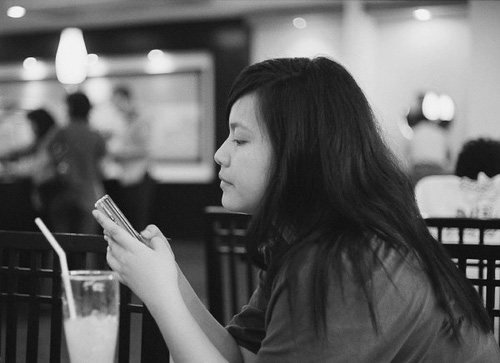
By introducing a flash, the photographer taints the natural scene. This would be a good black and white image.

Asher Kelman
March 22nd, 2009, 05:31 PM
By introducing a flash, the photographer taints the natural scene. This would be a good black and white image.
'Xactly, Rod!

However, folk like the Rzz-Ma-Tazz of color. For color, one has to resepct nature more or else become the Lord of The Rings, so to speak, and control everything!

Asher

Mike Shimwell
March 22nd, 2009, 05:32 PM
I agree with Rod about flash usage, but then my style tends away from flash except where I want the specific impact. I also agree that this makes a nice black and white picture, although I think the choice is about the image and not the difficulty with colour balancing. Here is a very quick PS conversion - Bob I'll happily take it down if you object - to give an idea of where it could go.

http://farm4.static.flickr.com/3539/3376883715_874c88fe4d_o.jpg


Asher, you raised some interesting points about the use of flash in fashion and the spreading of colour from oof hair into skin. Thanks

Mike

Mike Shimwell
March 22nd, 2009, 05:34 PM
'Xactly, Rod!

However, folk like the Rzz-Ma-Tazz of color. For color, one has to resepct nature more or else become the Lord of The Rings, so to speak, and control everything!

Asher


And the latter is surprisingly difficult to do well outside a studio where you can manage every light source:) One of my favourite shots is from a wedding where I shot a young man with a cup of coffee illuminated by (dim low wattage) tungsten light and the daylight was streaming across the room behind him. Balancing for his skin and the white coffee cup left a swathe of blue light across the room behind:)

Mike

Asher Kelman
March 22nd, 2009, 09:07 PM
And the latter is surprisingly difficult to do well outside a studio where you can manage every light source:) One of my favourite shots is from a wedding where I shot a young man with a cup of coffee illuminated by (dim low wattage) tungsten light and the daylight was streaming across the room behind him. Balancing for his skin and the white coffee cup left a swathe of blue light across the room behind:)

Mike
Well Mike,

If you have such a swathe of blue light and you want ot get rid of it, (hmm, it could look very cool), try the method I described from the tutorial discussed here (http://www.openphotographyforums.com/forums/showthread.php?t=8628) using a curves layer in which there's a mask with a gradient from the color you have to the one it should be. Seems like a good excercise anyway.

I'd like to correct one of these bad hair line colored transition areas. just want to find a good definite one of my own!

Asher

Mike Shimwell
March 22nd, 2009, 10:26 PM
Asher, no I like the blue light! It adds to the picture

Mike

Asher Kelman
March 22nd, 2009, 10:43 PM
Bob,

Your original picture gets better all the time, colors notwithstanding. We know it's a yellow light, and we just get used to it!

Asher

Bob Sumitro
March 22nd, 2009, 10:46 PM
Hi guys,

Asher: it was f/2 and 1/30.
Mike: I don't mind the B&W conversion at all, thanks.

Shooting digital (raw and use a WhiBal card) white balance is much simpler, but as far as I know the white balance adjustment in DPP doesn't work with jpg files. That's why I'm thinking about getting a Lightroom 2 which, according to some threads I read, can be used to adjust white balance of jpg file. I don't have a scanner and have to rely on photo lab to do the scanning, and the result of their scanned negatives are in jpg format.

Now, can I use WhiBal card when shooting with film? I mean to use it just as I do when shooting digital, i.e., place the card in the scene, take picture of it or take a picture with it in the scene, and use the eye dropper tool to pick it as the white balance?

Thanks, bob

Mike Shimwell
March 23rd, 2009, 12:42 AM
Bob, yes you could use a Whi Bal shooting film and processing the scans in LR.

If you keep shooting film eventually you will probably want to buy a scanner as, in my experience, it's much better making your own scans than starting from an auto adjusted lab jpg. Having said that, Ian Sitren seems to get some stunning scans from his MF work, so obviously it's possible - it probably depends on building a working relationship with the lab I suspect. Ian?

Mike

Bob Sumitro
March 23rd, 2009, 10:26 PM
Thanks Mike.

As for a scanner, I'm thinking about getting one ... but since the cost of film processing is not really expensive, it's about $4 per roll for processing and prints or scan to a cd, and finding a film scanner is quite difficult here, I haven't bought a scanner.

The other thing is, I bought my M6 to see if I like the experience of shooting with a rangefinder or not, and turns out I like it ... so I've been considering getting a digital M... if and when I have the money :-)

Thanks, bob