![]() |
|
HOME
FORUMS
NEWS
FAQ
SEARCH
|
|
|||||||
| Image Processing and Workflow RAW, DNG , TIFF and JPG. From Capture to Ready for Publish/Display. All software and techniques used within an image workflow, (except extensive retouching and repair or DAM). |
![]() |
|
|
Thread Tools | Display Modes |
|
#1
|
|||
|
|||
|
Seriously, Mac users can get close to the Kodachrome look by using Photo Raw Processor 64 (RPP). I've written elsewhere about the excellent images that the Ricoh GXR M-Module produces, about the files being generally better than those I've had from the M8 and M9 in terms of the clarity and transparency of the colours and in the white balance — I feel that generally GXR-M files require less post-processing as well. I process RAW files and for several years have been using Aperture. Last week, I started trying out RPP, shareware program available only for the Mac.
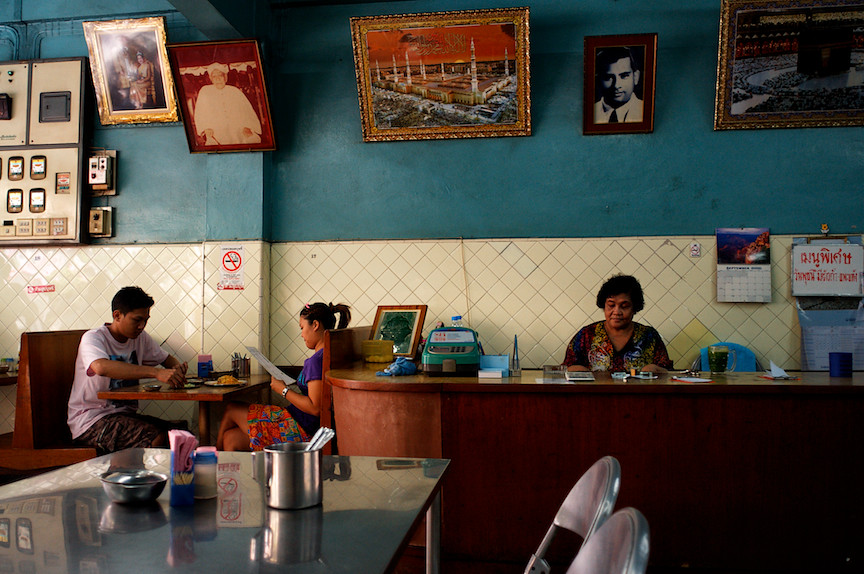
It's been a revelation because RPP does a much better job in raw development than Aperture or ACR: it simply produces better resolution and better color. Considering how good the GXR-M files are, it's worthwhile to optimize their quality by using RPP. I started using RPP at first to see how how much I was over- or under-exposing when I started "exposing to the right", but then saw that I could get better results with RPP than with Aperture. I've also seen comparisons with ACR, the raw developer used by Photoshop and Lightroom: the results with RPP are clearly better. Indeed, RPP gives very film-like results — you can stop missing Kodachrome. If you decide to use RPP, one caveat is that you need to devote some time to learn it: when you first see a file opened in RPP, it looks awful because the program doesn't make any automatic corrections — read the RPP documentation and you'll see why. Some practical information: RPP has a steep learning curve because it works so differently from Aperture and Lightroom, but I think the effort, even just in terms the increased resolution over other raw developers is worth it. In the manual there is a description of the work flow, but it takes a bit of study of the software to make sense of it. What I've been doing is the following: 1. Set the B&W balance if there is neutral gray in the picture (Command-click on the neutral area); 2. Select the KR64 color film curve; 3. Select the exposure using Compressed Exposure; 4. Set the Black Point (try 0.3 or 0.6); and 5. Set the Saturation (try 30-50). I'm not sure, but maybe step 3 should come before step 2. Step if is not always necessary, but in some cases is essential. Remember, RPP is only a raw develop and you may want or need to do colot correction or contrast changes in Aperture, Lghtroom or Photoshop. There is an option in the File Menu called "Optimize for post-procesing on Save", which saves a files with slightly less contrast to give 5% headroom for further processing in image editing software. BTW, I found the following list for the meaning of the film presets: A25 B&W = Agfa APX 25 P50 B&W = Kodak Vision2 50D Duo = Technicolor 2-Strip P160NC = Kodak Portra 160NC A100F = Fujichrome Astia 100F K64 = Kodachrome 64 V50 = Fujichrome Velvia 50 TC4 = Technicolor System4 Dye Transfer (Technicolor 3-Strip) LF = Kodak Ektar 25 As I said, the thing is to persevere, and you can get a real payoff. Learning darkroom development and printing required much more of an effort. The following five color pictures were all taken with the GXR-M and the Leica Elmarit-21 ASPH lens and developed in RPP, with slight adjustment in Aperture. I also processed all these pictured in Aperure and the results had less resolution and the colors were simply not as good. I'm also posting a B&W picture (taken with the Tele-Elmarit-90) that illustrates the type of photograph for which RPP's higher resolution is a great advantage. [Note: the last two pictures are in the response to this posting, owing the the 4-picture posting limit here.] ![]() ![]() ![]() ![]() —Mitch/Chiang Mai Ricoh GXR M-Module |
|
#2
|
|||
|
|||
|
|
|
#3
|
|||
|
|||
|
Here is the same file the first developed in RPP and the second in Aperture. It's not the best example of the markedly better resolution from RPP, but it shows how different the color rendition can be. In RPP I used the Kodachrome 64 preset. If you want to see the difference more clearly, you can download these two files and view them as a slide show in Preview on the Mac, or the equivalent program in Windows:
Developed in RPP ![]() Developed in Aperture ![]() —Mitch/Chiang Mai Ricoh GXR M-Module |
|
#4
|
|||
|
|||
|
Hi, Mitch,
What a treat on so many fronts. Beautiful images, fascinating scenes, great subjects, wonderful description of the workflow. Indeed the images somehow bring back memories (not the scenes, but rather the "appearance"). And it is very interesting your observations on the GXR-M. That is clearly quite a machine. Thanks so much. Best regards, Doug |
|
#5
|
|||
|
|||
|
Quote:
Mitch, To benefit from the M module of the GXR, one needs Leica or other compatible lenes and these define and limit what colors get into the camera. That subject is discussed separately here. Asher
__________________
Follow us on Twitter at @opfweb Our purpose is getting to an impressive photograph. So we encourage browsing and then feedback. Consider a link to your galleries annotated, C&C welcomed. Images posted within OPF are assumed to be for Comment & Critique, unless otherwise designated. |
![]() |
| Bookmarks |
| Thread Tools | |
| Display Modes | |
|
|
Similar Threads
|
||||
| Thread | Thread Starter | Forum | Replies | Last Post |
| Question: What Does This Need? What Is Missing? | Rachel Foster | Still Photo: Approaching Fine Photography | 24 | December 25th, 2009 10:04 PM |
| The missing link - what white balance tool? | Doug Kerr | CM Theory and Practice | 8 | April 9th, 2008 12:01 PM |
| Ah, the one missing part issue | Kathy Rappaport | Layback Cafe | 2 | October 7th, 2007 03:29 PM |
| How do you adjust a Copal No. 3 shutter (1 stop slow @ 125th sec.) | Will Thompson | Medium Format & Large Format Cameras | 6 | May 27th, 2007 10:52 PM |
| My cat as Missing Piece... | Louis Doench | Pet's Corner: Professional as well as enjoyable photos of your pets. | 3 | February 20th, 2007 01:35 PM |